Amara, ingeniería de marketing

Category: Sin categorizar

  • How to Choose an SLM and Deploy It in Your Project Step by Step

    How to Choose an SLM and Deploy It in Your Project Step by Step

    Choosing an SLM —a Small Language Model— is one of the most relevant technical decisions you can make when you want to integrate AI into a project without depending on external APIs or incurring exorbitant costs. Knowing how to choose an SLM correctly involves evaluating specific technical criteria, knowing the available tools and following an orderly implementation process. This guide takes you from the decision to deployment, including advanced patterns such as RAG and fine-tuning.

    What is an SLM and why does choosing it well matter?

    An SLM is an artificial intelligence model capable of processing and generating natural language with far fewer resources than a conventional LLM. Small language models perform specific tasks with fewer resources, making them the natural option for projects with hardware, privacy or budget constraints. Choosing an SLM appropriately directly determines the viability of the project.

    Unlike generalist LLMs, SLMs are usually designed with specific use cases in mind, which allows prioritizing efficiency, speed and control. In well-defined tasks —text classification, data extraction, internal assistants, content moderation—, a well-chosen model can outperform in practical terms a large one that is poorly adjusted. That is why knowing how to choose an SLM with criteria is as valuable as knowing how to deploy it.

    The ecosystem of small language models has grown enormously. Hugging Face has surpassed 2 million public models. Choosing an SLM poorly means wasted time, oversized infrastructure or mediocre results. Choosing an SLM well can make the difference between a viable project and one that never reaches production.

    When does it make sense to use an SLM instead of an LLM?

    Before getting into selection criteria, it is worth being clear about when a small model is the right answer. Choosing an SLM is the correct decision when one or more of these conditions are met:

    • Data privacy: you need data not to leave your infrastructure.
    • Critical latency: your application requires real-time or near-real-time responses.
    • Limited budget: calls to large model APIs are too costly at scale.
    • Bounded task: the model only needs to do one thing well, not everything.
    • Edge deployment: the model will run on a device with limited resources.

    On the other hand, if your case requires complex reasoning, open creative generation or handling multiple domains simultaneously, an LLM remains the most robust option. In that case, choosing an SLM might not be sufficient.

    What technical criteria should you use to choose an SLM?

    Making this decision rigorously requires evaluating at least five technical dimensions before downloading any model. Each criterion directly influences whether the SLM choice will be correct or not.

    Number of parameters and hardware requirements

    The size of the model —measured in billions of parameters (B)— directly determines how much memory you need. For hardware with 8 GB of VRAM, Phi-4-mini (3.8 B) is the best compact reasoner with approximately 3 GB of VRAM in Q4 quantization, and Gemma 3 4B is the best option if you need multimodal capabilities or support for more than 140 languages. This data is essential for choosing an SLM that fits your real infrastructure.

    As a general rule: models of 1-4 B parameters work on laptops with 8 GB of RAM; models of 7-14 B require a dedicated GPU or at least 16 GB of unified RAM. Do not choose the largest model that can run on your hardware; choose the smallest one that solves your task with sufficient quality. This principle is fundamental when choosing an SLM for any production environment.

    Latency and inference

    Latency —the time it takes the model to generate a response— depends on the model size, the hardware and the level of quantization applied. Quantization converts high-precision data to lower precision, which lightens the computational load and speeds up inference. Evaluating real latency on your hardware is an essential step before committing to a model in production. Ignoring this point is one of the most common mistakes when choosing an SLM.

    For interactive applications, aim for models that generate at least 20-30 tokens per second on your hardware. Tools like Ollama show you this metric directly during inference, making it easy to compare candidates when you need to choose an SLM with strict speed requirements.

    Accuracy on the specific task

    General benchmarks are indicative, but real accuracy is what you get on your specific task. A model with a high MMLU score may perform worse than a smaller one in, for example, entity extraction from legal documents in Spanish. This nuance is critical for choosing an SLM objectively.

    The practical recommendation: define a set of 20-50 representative examples of your use case and evaluate each candidate model on them before making the final decision. This is more valuable than any benchmark table and is the most reliable method for choosing an SLM with guarantees.

    License and commercial use

    Not all small language models are free for commercial use. Before integrating an SLM into a product, verify its license. This step is essential when choosing an SLM for a business environment. Qwen 3 SLM models are available under the Apache 2.0 license, and are free to download, fine-tune and use commercially. Other models, such as those in the Gemma family, have their own licenses that allow commercial use under certain conditions.

    Always review the license before building on a model. A subsequent license change can force you to migrate your entire implementation. Taking this into account from the start greatly simplifies choosing an SLM with legal guarantees.

    Multilingual support and real quality in Spanish

    If your project operates in Spanish or other languages other than English, multilingual support is a critical criterion when choosing an SLM. Some models like Qwen 3 support more than 100 languages and dialects. Models trained primarily in English can notably degrade their quality in Spanish.

    To illustrate the difference, consider this information extraction prompt in Spanish: “Extract the customer name, amount and due date from this invoice: ‘Customer: Distribuciones López S.L. Amount: 3,450.00 € Due date: 15/02/2026.’”

    With Qwen 3 4B, the output is structured and precise. With a model without real multilingual support, the typical response mixes languages, omits the currency symbol or reformats the date to the Anglo-Saxon standard. Always test with examples in the production language: public benchmarks are usually measured in English and do not reflect real quality in Spanish. This step is especially relevant when choosing an SLM for Spanish-speaking projects.

    What small language models are available today?

    Visual comparison of available small language models with parameters, memory consumption and inference speed
    Popular models range from 3 billion parameters (very fast, less accurate) to 14 billion (more accurate, higher latency), allowing you to choose according to your balance of resources and quality.

    The ecosystem of small language models has matured rapidly. Knowing the available catalog is indispensable for choosing an SLM in an informed way. These are the most relevant ones in 2025-2026:

    Comparison of popular SLMs for local deployment
    Model Parameters Strength License
    Phi-4-mini 3.8 B Compact reasoning, low consumption MIT
    Gemma 3 4B 4 B Multimodal, 140+ languages Gemma (commercial allowed)
    Llama 3.2 3B 3 B Performance/size balance Llama 3 Community
    Qwen 3 4B 4 B Multilingual, coding, reasoning Apache 2.0
    Mistral 7B 7 B Instructions, general use Apache 2.0

    Phi-4 (14 B) is the reference SLM in general benchmarks —84.8% on MMLU, surpassing GPT-4o in mathematics— and fits in a 12 GB GPU. However, for projects with more limited hardware, 3-4 B models are the most pragmatic starting point for choosing an SLM without oversizing the infrastructure.

    What SLM tools exist for local deployment?

    The tools for local SLM deployment have matured to the point where any developer can have a model running in minutes. Choosing an SLM correctly also involves choosing the right deployment tool.

    Ollama: the standard for local deployment

    Ollama has become the de facto standard for local language model management due to its simplicity: it manages model weights, environment configuration and the API server in a single package. It is one of the first tools you should consider when choosing an SLM for development environments.

    Its most practical advantage is automatic integration: Ollama automatically creates a local server at localhost:11434, which allows integrating the model into Python or JavaScript applications with ease. Furthermore, Ollama allows running models without an internet connection, which helps protect sensitive data. You can consult the official Ollama documentation to see the supported models.

    LM Studio: visual interface for comparing models

    LM Studio provides a graphical interface for users who want to compare different models from Hugging Face; it allows viewing resource usage (CPU/RAM) in real time and selecting specific quantization levels. It is especially useful in the evaluation phase, when you are still trying to choose an SLM among several candidates.

    LM Studio became free for commercial use in July 2025. If you are new to the small model ecosystem, LM Studio is the most user-friendly entry point for choosing an SLM without prior experience.

    llama.cpp and Hugging Face Transformers

    For developers who need greater control, llama.cpp is especially efficient for running quantized models natively. Ollama runs llama.cpp internally, so using it directly gives you access to more configuration options in exchange for greater complexity. This option is suitable when you need to choose an SLM and fine-tune the inference parameters to the maximum.

    Hugging Face Transformers offers a wider range of models and tasks. It is the natural option if you already work with the Python machine learning ecosystem and want to integrate an SLM into an existing data pipeline. Choosing an SLM through Transformers gives access to the largest available model repository.

    RAG with SLM: connect the model to your documents without retraining it

    RAG (Retrieval-Augmented Generation) is the most common architectural pattern for extending the capabilities of an SLM without modifying its weights. The central idea is simple: instead of retraining the model with your data, you provide relevant context in each query, retrieved in real time from your own knowledge base. Choosing an SLM compatible with this pattern greatly expands its usefulness.

    The basic flow of a RAG architecture with a local SLM has three steps:

    1. Indexing: your documents are divided into fragments and converted into numerical vectors using an embeddings model. These vectors are stored in a vector database such as ChromaDB or Qdrant.
    2. Retrieval: when the user asks a question, the system converts the question into a vector and searches for the most similar fragments in the database.
    3. Generation: the SLM receives the original question together with the retrieved fragments and generates a response grounded in that specific information.

    To implement this pattern with a local model, the two most widely used frameworks are LlamaIndex and LangChain. LangChain excels at orchestrating multi-step AI workflows, while LlamaIndex focuses on optimizing document indexing and retrieval. Both make it easier to choose an SLM and connect it to your internal data sources.

    When to use RAG instead of fine-tuning? RAG is the right option when your data changes frequently or when you need the model to cite specific sources. Fine-tuning is more appropriate when you want to modify the model’s response style or specialize its behavior in a static domain. This distinction also influences how to choose the base SLM for each case.

    When to use RAG, fine-tuning or base model? Decision table

    Decision matrix: base model vs. RAG vs. fine-tuning
    Situation Recommendation Reason
    The task is well covered by the pre-trained model Base model Lower complexity, zero adaptation cost
    You need answers about your own documents or changing data RAG No retraining; updatable in real time
    You need brand tone, proprietary categories or very specific behavior Fine-tuning The model internalizes the style and patterns of the domain
    Static domain + specific tone + own data Fine-tuning + RAG Optimal combination for maximum performance in a closed domain

    This table is a quick guide for choosing an SLM with the correct adaptation strategy according to your specific situation.

    SLM fine-tuning: when and how to adjust the model to your domain

    Fine-tuning consists of continuing the training of a pre-trained SLM with your own domain data, so that the model internalizes the vocabulary, style and specific patterns of your use case. It is the right option when RAG is not enough: for example, when you need the model to adopt a very specific brand tone or classify according to proprietary categories. Before applying it, it is important to choose a base SLM that is compatible with the adjustment techniques you plan to use.

    LoRA and QLoRA: efficient fine-tuning on modest hardware

    Full retraining of an SLM requires prohibitive computing resources. Low-rank adaptation techniques (LoRA and QLoRA) solve this problem: instead of updating all the model’s parameters, only additional low-rank matrices are trained that are added to the original, frozen weights. The original LoRA paper (Hu et al., 2021) demonstrated that this technique can match the performance of full fine-tuning with up to 10,000× fewer trainable parameters. This makes choosing an SLM for fine-tuning with LoRA accessible even with modest hardware.

    QLoRA takes this a step further by combining 4-bit quantization with LoRA. With QLoRA it is possible to fine-tune 3B parameter models using only 8 GB of VRAM. Choosing an SLM compatible with QLoRA significantly expands the fine-tuning options on consumer hardware.

    Fine-tuning tools: Unsloth and Axolotl

    Two tools stand out today as the most accessible for fine-tuning SLMs on consumer hardware:

    • Unsloth: uses custom CUDA/Triton kernels that accelerate fine-tuning with LoRA and QLoRA up to 5× while reducing memory usage. It is the fastest option for a single GPU. However, it does not support multi-GPU training.
    • Axolotl: community-oriented for LLM fine-tuning, with YAML-based configurations and extensive integration with Hugging Face libraries. It is the natural option for multi-GPU environments.

    The minimum process for fine-tuning with Unsloth is: prepare a dataset in JSONL format with instruction-response pairs, configure the LoRA parameters, launch the training and export the resulting adapter. With 500-2000 quality examples, an SLM of 3-4 B can specialize notably in a specific task. Choosing an SLM of the right size is the first step before starting any fine-tuning process.

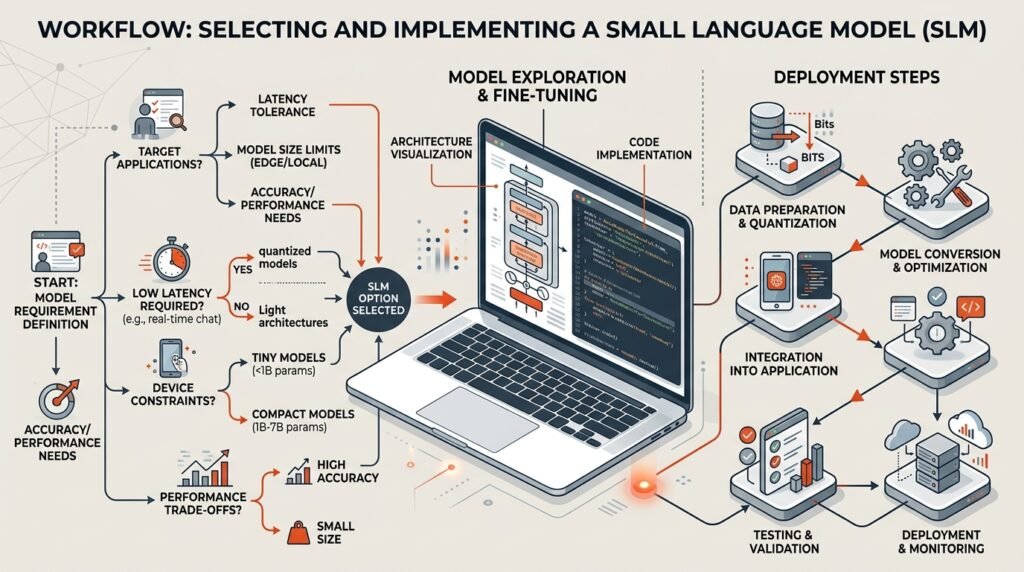
    How to implement an SLM in your project step by step?

    Implementing an SLM in a real project always follows the same process, regardless of the model or tool you choose. These steps also serve as a guide for choosing an SLM with methodological rigor.

    1. Define the task precisely. Write in one sentence what the SLM must do: “classify support tickets into 5 categories”, “summarize contracts in less than 100 words”. The more bounded the task, the easier it will be to choose the right SLM and implement it.
    2. Evaluate your available hardware. Check the available RAM, whether you have a dedicated GPU and how much VRAM it has. This will determine the range of model sizes you can run and will significantly narrow down how to choose a viable SLM.
    3. Select 2-3 candidate models. Using the criteria described above, choose a small set of candidates. For projects in Spanish, Qwen 3 4B, Gemma 3 4B and Llama 3.2 3B are a good starting point for choosing an SLM with multilingual support.
    4. Install Ollama and download the candidate models. Once installed, download the models with commands like ollama pull qwen3:4b. It is the fastest method for choosing an SLM and testing it locally.
    5. Evaluate with real data. Prepare a set of 20-50 examples of your use case and run each candidate model. Measure accuracy, latency and subjective quality. This evaluation is the objective basis for choosing the definitive SLM.
    6. Apply quantization if necessary. If the chosen model is too slow, try a quantized version (Q4 or Q8). Quantization allows choosing larger SLMs without exceeding your hardware limits.
    7. Integrate via local API. Once the choice is confirmed, integrate it into your application through the local endpoint that Ollama exposes:

    Option A — official Ollama library for Python:

    # pip install ollama
    import ollama

    response = ollama.chat(
    model=”qwen3:4b”,
    messages=[
    {
    “role”: “user”,
    “content”: “Classify this ticket into one of these categories: Billing, Technical support, Shipping, Other. Ticket: ‘My order 12345 has not arrived.’”
    }
    ]
    )

    print(response[“message”][“content”])

    Option B — direct HTTP call with requests:

    import requests, json

    payload = {
    “model”: “qwen3:4b”,
    “messages”: [
    {
    “role”: “user”,
    “content”: “Classify this ticket into one of these categories: Billing, Technical support, Shipping, Other. Ticket: ‘My order 12345 has not arrived.’”
    }
    ],
    “stream”: False
    }

    resp = requests.post(“http://localhost:11434/api/chat”, json=payload)
    data = resp.json()
    print(data[“message”][“content”])

    1. Consider RAG or fine-tuning if base performance is not sufficient. If the model responds well in general but does not know your own data, implement a RAG pipeline. If you need to change the behavior or style of the model, consider fine-tuning with LoRA/QLoRA. In both cases, choosing a base SLM compatible with these techniques greatly facilitates integration.
    2. Monitor and adjust. In production, systematic tracking is what separates a prototype from a reliable system. Choosing an SLM with good documentation and an active community facilitates problem resolution in this phase.

    SLM monitoring in production: tools and metrics

    The monitoring step is the most undervalued of the entire implementation. Without observability, you cannot know when the model fails, why it fails or how to improve it. Choosing an appropriate SLM for production includes considering from the outset how you are going to monitor it.

    Traceability tools for LLM

    Two tools stand out as the standard for observability of language model-based systems:

    • Langfuse: open-source traceability platform for LLMs that records each model call with its prompt, response, latency and estimated cost. It integrates with LangChain, LlamaIndex and direct API calls. It is the most recommended option for small teams that need quick visibility without complex infrastructure. It is especially useful when you have had to choose an SLM without prior experience in observability.
    • Phoenix (Arize): open-source tool focused on evaluation and debugging of RAG and LLM pipelines. Especially useful when you have a RAG pipeline and want to understand which fragments are retrieved and how they affect response quality. Choosing an SLM with active community support facilitates its integration with Phoenix.

    Minimum metrics to record

    Regardless of the tool you use, these are the metrics you should record from the first day in production:

    • p50 and p95 latency: the median tells you typical performance; the 95th percentile tells you how long slow calls take. A p95 above 5 seconds is usually unacceptable in interactive applications. If you detect this problem, it may be a sign that you should choose a lighter SLM or apply more quantization.
    • Error rate: percentage of calls that return an error or an empty response. A rate above 1% in production requires immediate investigation.
    • Response length: responses that are systematically shorter or longer than expected indicate problems with the prompt or the configured temperature.
    • Rejection or hallucination rate: in extraction or classification tasks, measure how many responses do not follow the expected format. A sustained increase may indicate that it is worth choosing an SLM with a better fit to your task.

    Minimum viable log without external tools

    If you cannot integrate Langfuse or Phoenix immediately, this is the minimum log you should implement in Python to have basic visibility:

    import time, json, logging

    logging.basicConfig(filename=”slm_production.log”, level=logging.INFO)

    def call_model_with_log(prompt: str, model: str = “qwen3:4b”) -> str:
    import requests
    start = time.time()
    try:
    resp = requests.post(
    “http://localhost:11434/api/chat”,
    json={“model”: model, “messages”: [{“role”: “user”, “content”: prompt}], “stream”: False},
    timeout=30
    )
    latency_ms = (time.time() – start) * 1000
    output = resp.json()[“message”][“content”]
    logging.info(json.dumps({
    “model”: model,
    “latency_ms”: round(latency_ms, 1),
    “prompt_len”: len(prompt),
    “response_len”: len(output),
    “status”: “ok”
    }))
    return output
    except Exception as e:
    latency_ms = (time.time() – start) * 1000
    logging.error(json.dumps({“model”: model, “latency_ms”: round(latency_ms, 1), “status”: “error”, “error”: str(e)}))
    raise

    This log in JSONL format is directly importable into any analysis tool and allows you to detect performance degradations without depending on external platforms. It is valid regardless of the SLM you have chosen.

    What are the most common mistakes when choosing and implementing an SLM?

    Common mistakes in SLM selection: excessive sizing, ignoring latency, inadequate infrastructure, insufficient testing
    Choosing a model that is too large for your available hardware is the most costly mistake; many developers underestimate the importance of validating latency before moving to production.

    Knowing the common mistakes saves you weeks of work. These are the most frequent ones when working with small language models for the first time and trying to choose an SLM without a clear methodology.

    Choosing by popularity instead of by fit to the task

    The most downloaded model is not necessarily the best for your case. Always evaluate on your own data before committing. Selecting by popularity without empirical validation is one of the most frequent and most avoidable mistakes when choosing an SLM. Popularity is an indicator of community, not of suitability for your specific task.

    Ignoring the limitations of SLMs

    Limited processing capacity can lead to reduced accuracy in tasks involving multi-factor reasoning or high levels of abstraction; therefore, they may not be the best option for applications that require high accuracy, such as scientific research or medical diagnosis. Knowing these limitations is an essential part of knowing how to choose an SLM correctly.

    Skipping the evaluation phase

    Many teams install the first model they find and integrate it directly into production. The evaluation phase with real data is the most profitable investment in the process: it detects problems before they reach users and allows choosing an SLM objectively among the available options.

    Not considering multilingual support from the start

    If your project operates in Spanish, verifying multilingual support from the beginning is critical. Some models notably degrade their quality in Spanish. Always test with examples in the production language, not in English. Overlooking this point when choosing an SLM can ruin the end-user experience even with a technically solid model in English.

    How does local AI deployment fit into a business strategy?

    Local AI deployment with small models is not just a technical decision: it is also a strategic decision. Choosing your own SLM allows SMEs and entrepreneurs to have AI capabilities without depending on external providers, without variable per-call costs and without handing over customer data to third parties.

    To illustrate the economic argument, this indicative estimate compares the cost of an external API versus own infrastructure for a volume of 1 million inferences per month:

    Cost estimate: external API vs. local SLM (1M inferences/month, ~500 token prompts)
    Scenario Estimated cost/month Privacy Latency
    GPT-4o mini API ~€150-300 Data at external provider Variable (network)
    Local SLM (Qwen 3 4B, own server) ~€20-40 (electricity + amortization) Data in your infrastructure Low and predictable
    SLM on cloud VPS (shared GPU) ~€60-100 Data on your VPS Medium-low

    The key point is not the exact number, but the cost structure: with external APIs you pay per inference; with your own SLM, the cost is fixed and scales without marginal cost. Beyond a certain volume, the local model is more economical and more secure. Choosing a local SLM over an external API is, at that scale, as important a business decision as a technical one.

    The most immediate use cases for marketing and business teams include: automatic lead classification, sentiment analysis in reviews, generation of internal content drafts, or customer service assistants that run entirely on your own infrastructure. The key is to start with a bounded task, measure it and scale only when the value is proven. Choosing the right SLM for that first use case is the starting point of any sustainable local AI strategy.

    Frequently asked questions

    How much RAM do I need to run an SLM locally?

    It depends on the model size. For 3-4 B parameter models with Q4 quantization, 8 GB of RAM is sufficient on a modern laptop without a dedicated GPU. For 7 B models, it is recommended to have at least 16 GB of RAM or a GPU with 8 GB of VRAM. Tools like LM Studio show you consumption in real time before confirming the choice, which greatly facilitates knowing how to choose an SLM that fits your hardware.

    What is the difference between Ollama and LM Studio for implementing an SLM?

    Ollama is developer-oriented: it manages models from the command line and exposes a local API that you can consume from any application. LM Studio offers a more visual graphical interface, ideal for comparing models and exploring options without writing code. For production, Ollama is the most common option; for evaluation and experimentation, LM Studio is more comfortable. Both tools are complementary and useful in different phases of the implementation process. Choosing an SLM with one or the other depends on the stage of the project and the team’s profile.

    Can I use an SLM in Spanish with good quality?

    Yes, but you must choose a model with real multilingual support; this is one of the most important considerations when choosing an SLM for projects in Spanish. Qwen 3 and Gemma 3 are the most solid options for Spanish in the small model range. Always verify performance with examples in Spanish before deciding, as benchmarks are usually measured in English and do not necessarily reflect quality in other languages.

    How do I monitor an SLM in production without complex tools?

    The most accessible starting point is a structured log in JSONL format that records latency, prompt and response length, and the status of each call. With that log you can detect performance degradations in any analysis tool. When volume grows, Langfuse (open-source) is the most recommended option for complete LLM traceability without complex infrastructure; Phoenix (Arize) is the best alternative if you have a RAG pipeline and need to evaluate retrieval quality. Choosing an SLM with an active community also makes it easier to find solutions to monitoring problems.

    When does it make sense to fine-tune instead of using RAG?

    RAG is the first option when your data changes frequently or you need the model to cite specific sources: it requires no retraining and is updatable in real time. Fine-tuning is the right option when you need to modify the base behavior of the model: adopting a specific brand tone, classifying according to proprietary categories or generating code in an internal framework. Both patterns are complementary: combining them is the route to the best performance in closed domains. The decision about which to use also influences how to choose the most suitable base SLM for each approach.

    Sources

  • Enterprise RAG: architecture, tools, GDPR and costs for SMEs

    Enterprise RAG: architecture, tools, GDPR and costs for SMEs

    If you’ve ever spent twenty minutes searching for an internal procedure that “was in some PDF somewhere”, you know exactly the problem that enterprise RAG solves. RAG — short for Retrieval-Augmented Generation — is the artificial intelligence architecture that connects a language model with your own internal documents so that any team member can ask questions in natural language and get precise, cited, and verifiable answers.

    What is enterprise RAG and why does it matter now?

    Enterprise RAG is an architecture that combines semantic search in vector databases with natural language generation, allowing models like Claude or GPT-4o to respond with verifiable information from your own sources instead of making up data. In practice, this means the AI doesn’t “know” things from memory: it searches your documents before responding.

    The difference from a generic chatbot is fundamental. A conventional chatbot only responds with the model’s general knowledge, does not access internal documents, and can “hallucinate” answers when it lacks information. Enterprise RAG, on the other hand, responds with company-specific information, cites exact sources, and is far more accurate for business use cases. This precision is precisely what makes enterprise RAG such a relevant solution for teams managing complex internal documentation.

    Why does it matter now? Because a 20-person SME loses between 40 and 80 hours per week searching for internal documents — between 2 and 4 hours per person per week, according to McKinsey. Enterprise RAG turns that lost time into queries resolved in seconds.

    How does intelligent search work under the hood?

    Understanding the mechanics of enterprise RAG doesn’t require being a data engineer. The process follows three steps that chain together automatically every time someone asks a question.

    Step 1: document indexing and vectorisation

    The system first processes all your internal documents — PDFs, wikis, spreadsheets, manuals — and converts them into numerical representations called embeddings. These vectors are organised in a multidimensional mathematical space where semantically close fragments end up nearer to each other. This vector database is the heart of the system.

    Dividing documents into appropriately sized fragments — chunking — is essential in any enterprise RAG implementation: if the fragments are too large, the embeddings become too general and do not match user queries well. Getting the fragment size right makes the difference between precise and vague answers. Some advanced pipelines combine vector search with classic BM25 — known as hybrid search — to improve precision in corpora with very specific terminology.

    Step 2: semantic retrieval and reranking

    When a user submits a query, enterprise RAG converts the question into a vector representation (embedding) and searches the database for the most similar fragments. This search is fast and highly relevant thanks to vector similarity algorithms. In more advanced implementations, a reranking step reorders the retrieved fragments before passing them to the model, improving result relevance without increasing the cost of the initial search.

    The key here is that the search is semantic, not literal. If you ask “what are our warranty conditions for the retail sector?”, the system doesn’t look for that exact phrase: it understands the meaning and retrieves relevant fragments even if they use different vocabulary. This is what differentiates the intelligent search of enterprise RAG from a simple Ctrl+F in your folders.

    Step 3: generation with verifiable context

    With the data retrieved from the knowledge base, the system creates a new prompt for the language model that includes the user’s original query plus the enriched context. The size of that context — the context window — limits how many fragments the model can process at once, which makes chunking and reranking decisive. The result is a natural language response that cites the source document, not an invented answer. In agentic RAG architectures, the system can also chain multiple searches autonomously to answer complex questions that require crossing several sources.

    What real problems does it solve in an SME?

    Enterprise RAG is not a solution in search of a problem. There are concrete use cases where the return is immediate and measurable.

    • Onboarding new employees: new employees consult manuals, regulations, and procedures without interrupting anyone, and the enterprise RAG assistant cites the exact source document.
    • Internal customer support: the assistant searches your documentation — PDFs, Confluence, SharePoint, Notion — before responding. Any support agent has the correct answer in seconds.
    • Legal and compliance: semantic search over contracts and policies delivers the exact document quote and page number; for companies undergoing certification, having the regulatory corpus queryable via enterprise RAG accelerates audits such as ISO 27001.
    • Commercial knowledge management: the sales team can ask “what proposal did we send to the hospitality sector last year?” and get the document in seconds, ready to adapt.
    • Development and IT: runbooks, architecture decisions, postmortems, and incident history queryable in natural language. A well-built knowledge graph over this corpus also enables discovery of system dependencies that would otherwise remain buried in scattered documents.

    How does RAG differ from fine-tuning?

    Visual comparison: RAG retrieves documents for real-time queries versus fine-tuning which adjusts the model through training
    RAG is faster to implement and update (documents change without retraining), while fine-tuning requires labelled data and costly retraining.

    This is one of the most frequent questions when a company starts exploring AI applied to its internal documents. The confusion is understandable, but the difference is decisive for making the right choice.

    Unlike fine-tuning, enterprise RAG updates knowledge in real time without retraining models. This means that when you update an internal procedure, you simply upload the new document to the system and RAG incorporates it immediately. With fine-tuning, you would need to retrain the entire model, which involves cost, time, and advanced technical knowledge.

    For the vast majority of SMEs, enterprise RAG is the right choice: lower investment, launch in weeks, and the ability to update knowledge simply by uploading new documents to the system. Fine-tuning makes sense when you need the model to adopt a very specific style or work with highly specialised terminology, but for internal information retrieval, enterprise RAG wins in almost every scenario.

    Embedding models: the technical decision that most affects cost and privacy

    Choosing the embedding model is as important as choosing the LLM, yet it is the decision most often made by default. The embedding model determines the quality of vectorisation, the cost per indexed document, and — critically — whether data leaves your infrastructure or not.

    Embedding model Dimensions Privacy / data residency Indicative cost Best for
    OpenAI text-embedding-3-small 1,536 Cloud API; EU residency from Feb. 2025 ~$0.02 / million tokens SMEs already using OpenAI that prioritise ease of integration
    OpenAI text-embedding-3-large 3,072 Cloud API; EU residency from Feb. 2025 ~$0.13 / million tokens Large corpora where semantic precision is critical
    Cohere Embed v3 1,024 Cloud API; private deployment option ~$0.10 / million tokens Multilingual corpora (Spanish included) and hybrid search
    nomic-embed-text 768 Open source; 100% on-premise Own compute cost (no licence) Maximum privacy; teams with their own GPU or dedicated VPS
    BGE-M3 (BAAI) 1,024 Open source; 100% on-premise Own compute cost (no licence) Technical or legal corpora in Spanish with specific terminology

    The practical rule is simple: if documents contain personal data, open source on-premise models eliminate the debate about international data transfers. If the corpus is technical or product-related without sensitive data, OpenAI’s text-embedding-3-small offers a quality-to-cost ratio that is hard to beat. For corpora in Spanish with legal or medical terminology, Cohere Embed v3 and BGE-M3 typically outperform OpenAI models in semantic precision.

    What tools do you need to implement RAG in your company?

    A custom-built enterprise RAG implementation relies on three technology layers. You don’t need to build them from scratch: there are mature solutions for each one.

    Vector database

    This is where your documents’ embeddings are stored. The most common options for SMEs are Pinecone (managed SaaS, no own infrastructure), Qdrant (open source, can be deployed on-premise for greater privacy), and pgvector. If your company already uses PostgreSQL, you don’t need to contract a new database: just install the pgvector extension and you’re done. For 90% of companies, this is sufficient.

    Language model (LLM)

    This is the component that generates the natural language response from the retrieved context. GPT and Claude remain the reference models for complex reasoning; their price has dropped dramatically compared to previous years. For companies with strict privacy requirements, open source models such as Meta’s Llama or Mistral have reached a level where they can run enterprise RAG correctly on their own infrastructure.

    Orchestration framework

    LangChain and LlamaIndex are the most widely used frameworks for connecting all pipeline components — indexing, retrieval, reranking, generation — without having to code each piece from scratch. For teams without developers, platforms like Flowise or n8n allow building RAG flows visually, significantly reducing the technical barrier.

    Which enterprise RAG stack fits your profile? Decision tree

    Before evaluating tools, answer these three questions in order. Each branch leads to a concrete recommendation and prevents you from spending time analysing options that don’t fit your actual situation.

    1. Do you have developers on the team (or budget to hire them)?

      • No → Go directly to a no-code SaaS platform: Guru if you need human-verified knowledge, Vectara if you prioritise hallucination control via API without code. Both have connectors for Google Workspace and Microsoft 365.
      • Yes → Move to question 2.
    2. Does the corpus contain personal data (contracts, files, records)?

      • Yes → You need an on-premise or private cloud architecture. Recommended stack: pgvector + LangChain + Llama/Mistral on your own VPS or server. Embedding model: nomic-embed-text or BGE-M3. Zero data leaves your infrastructure.
      • No → Move to question 3.
    3. Does the corpus exceed 5,000 documents or do you need to connect more than five different sources?

      • Yes → Consider Glean (native connectors for 100+ apps, permission inheritance included) or a custom stack with Qdrant + LlamaIndex for greater control.
      • No → A pilot with pgvector + LangChain + OpenAI text-embedding-3-small + GPT-4o mini is sufficient to validate the concept. API cost: under €50 per month in the pilot phase.

    SaaS RAG platforms: when to buy instead of build

    Not all SMEs have the technical capacity to build a RAG pipeline from scratch. For them, SaaS RAG platforms are the fastest route to production: connect your data sources, configure permissions, and start querying, without managing infrastructure. Buying makes sense when RAG is an internal capability for the team: connectors, permission inheritance, audit logs, and SSO integration are non-trivial components to build and even harder to maintain.

    Platform Ideal profile Privacy / EU data Ease of deployment Indicative price
    Glean Mid-to-large companies with many apps (Slack, Drive, Jira, Confluence…) Cloud; review DPA for GDPR High — native connectors for 100+ apps Custom quote (enterprise)
    Guru Teams that need human-verified and curated knowledge Cloud; SOC 2; check residency High — no-code interface, verification every 90 days From ~$10/user/month (Starter plan)
    Vectara Technical teams wanting RAG-as-a-Service via API with hallucination control Cloud SaaS; review DPA Medium — requires API integration Free plan + pay-as-you-go paid plans
    Flowise / n8n SMEs with some technical profile wanting to build RAG flows visually Self-hosted available (maximum control) Medium-high — visual interface, no code Open source; cloud from ~$35/month
    Custom stack (pgvector + LangChain + LLM API) Teams with developers needing full pipeline control On-premise or own cloud Low — requires development API cost + team time

    For teams that want RAG without infrastructure management, Vectara and Glean are the fastest paths to production: upload documents, start querying, no pipeline engineering. Guru, for its part, requires internal experts to review and re-approve knowledge cards on a fixed cycle — typically every 90 days; if a card expires without verification, the AI agent cannot use it, resulting in a verified RAG based only on reliable and up-to-date content. Both Guru and Glean have native connectors for Google Workspace and Microsoft 365, the two most common ecosystems in SMEs, eliminating the need for manual integration work.

    GDPR and EU data residency: the barrier nobody mentions

    GDPR compliance scheme in enterprise RAG: data flow, permissions and EU residency
    GDPR compliance in an enterprise RAG system depends on where data resides, which fragments are sent to the LLM, and what data processing agreements exist with providers.

    For an SME, the question of privacy is not optional: it is a real adoption barrier. When an enterprise RAG system processes documents containing personal data — client contracts, employee records, support histories — it falls within the scope of the GDPR and, since 2024, also the EU AI Act.

    The Spanish Data Protection Agency (AEPD) published its guide on the use of artificial intelligence and data protection in 2024, reminding that any system that processes personal data — including fragments sent to an LLM — must have a legal basis, a record of processing activities, and, where applicable, a data protection impact assessment (DPIA). ENISA, for its part, noted in its AI threat report that data exfiltration through third-party APIs is one of the most underestimated risk vectors in generative AI deployments at European companies.

    In practice, there are three architectural decisions that determine your level of risk:

    • On-premise or private cloud: your documents never leave your infrastructure. This is the safest option for highly sensitive data and eliminates the debate about international transfers. Open source models like Llama or Mistral make this viable without licence costs.
    • LLM API with EU residency: EU data residency for OpenAI arrived for data at rest in February 2025 and was extended to inference within the European region in January 2026, although granularity is regional, not by specific country. Microsoft Copilot keeps data within the EU Data Boundary. In both cases, you must sign a DPA (data processing agreement) with the provider before indexing any document containing personal data.
    • SaaS RAG platforms: always check whether they offer a DPA, in which region data resides, and whether they hold certifications such as SOC 2 or ISO 27001. No solution is GDPR-compliant on its own; the company remains the data controller under Article 24 of Regulation (EU) 2016/679.

    The practical recommendation: before indexing any document, classify the corpus according to whether it contains personal data. Purely technical or product documents can go to a cloud solution without issue; employee records or client contracts deserve an on-premise architecture or, at minimum, a provider with a signed DPA and verified EU residency.

    How to implement RAG step by step in an SME?

    Implementing enterprise RAG in an SME follows a logical sequence that moves from the simplest to the most complex. Here is the practical roadmap.

    1. Document audit: identify which knowledge bases exist (Drive, SharePoint, Notion, local PDFs), what state they are in, and which generate the most repetitive queries. The quality of the corpus determines the quality of enterprise RAG.
    2. Pilot use case definition: choose a single department or process — for example, onboarding new employees or support team FAQs — with relatively well-organised documentation.
    3. Technology stack selection: for an enterprise RAG pilot in an SME, a combination such as pgvector + LangChain + OpenAI or Claude API is sufficient to validate the concept without over-engineering. If there is no technical team, consider a SaaS platform like Guru or Vectara.
    4. Indexing and chunking: process the documents, divide them into coherent fragments, and generate the embeddings. Knowledge bases must be continuously updated to maintain the quality and relevance of the system.
    5. Query pipeline construction: configure the complete flow: question intake → semantic search (or hybrid search) → reranking → fragment retrieval → response generation with source citation.
    6. Evaluation and metrics: see the specific section below.
    7. Deployment and governance: an enterprise RAG architecture must address security, permissions, traceability, and data governance. Define who accesses which documents and how queries are audited.

    Production system maintenance: the lifecycle nobody explains

    Deploying the pilot is only half the work. An enterprise RAG system in production degrades if not actively maintained, because documents change, models are updated, and the corpus grows in a disorganised way.

    These are the four processes you must have covered from day one:

    • Document versioning and reindexing: when an internal procedure changes, the old document must be marked as obsolete and the new one must be reindexed immediately. If you don’t have this process automated, the system will start responding with outdated information without anyone noticing. Tools like LlamaIndex allow configuring incremental reindexing so that only modified documents are processed, not the entire corpus.
    • Obsolescence management: establish an expiry policy for each document type. A product manual may have a six-month validity; an internal HR policy, one year. Guru handles this with its 90-day verification cycle; in custom stacks, you need to implement it yourself.
    • Corpus drift monitoring: when the document volume grows significantly, the semantic distribution of the corpus changes and embeddings generated months ago may lose precision. A monthly sample of 20–30 reference queries detects these drifts before they impact users.
    • Model updates: when the provider releases a new version of the embedding model or LLM, evaluate whether it is worth reindexing the entire corpus. Switching from text-embedding-3-small to text-embedding-3-large, for example, requires regenerating all vectors; the cost is low, but the process must be planned.

    How to measure whether your enterprise RAG is working well: metrics and evaluation

    “The system responds” is not enough. An enterprise RAG system in production needs concrete metrics to detect degradations before users notice them.

    The four key metrics of the RAGAS framework

    Imagine your RAG system is a researcher looking up information for you. RAGAS measures two things: whether the researcher found the right documents (retrieval) and whether they then faithfully reported what they found (generation). If it fails on the first, the answer will be incomplete; if it fails on the second, the answer will be fabricated even if the documents were correct.

    • Faithfulness: measures whether each claim in the response is supported by the retrieved fragments. Think of it as the percentage of sentences in the response that you can underline in the source documents. A threshold of 0.85 is the standard in production; if the weekly average drops more than 5%, investigate.
    • Context Precision: proportion of retrieved fragments that are genuinely relevant to the question. A low value indicates that reranking or chunking needs adjustment.
    • Context Recall: proportion of the knowledge needed to answer that the system has managed to retrieve. A low value indicates that the corpus is incomplete or poorly indexed.
    • Answer Relevancy: measures whether the generated response is pertinent to the original question, regardless of whether it is faithful to the context.

    Typical reference thresholds in production are: faithfulness 0.75, answer relevancy 0.80, context precision 0.70, context recall 0.80. Faithfulness is the metric that separates a hallucination-prone system from a reliable one: all the others exist to keep it at acceptable levels.

    Evaluation tools

    RAGAS provides the conceptual framework; DeepEval adds CI/CD integration; Patronus, Langfuse, and Lynx cover specific gaps in hallucination detection, production traceability, and bias evaluation. For teams just starting out, RAGAS or DeepEval are the best option for volumes of up to ~2,000 weekly evaluations if you already use Grafana or Datadog.

    The recommended cadence: a set of 50–100 reference questions with expected answers run on every pipeline change, plus a 1% sample of real production traffic to detect silent degradations from corpus or model drift.

    What are the most common mistakes when implementing RAG?

    Knowing common mistakes before you start saves time and money. These are the ones that appear most regularly in enterprise RAG projects.

    • Disorganised or outdated corpus: enterprise RAG amplifies the quality of your documents, it doesn’t fix it. If manuals have three contradictory versions, the system will return contradictory answers. Before indexing, clean and version your documents.
    • Ignoring chunking: poor document fragmentation is the most common cause of imprecise answers. A fragment that is too small loses context; one that is too large saturates the model’s context window.
    • Neglecting latency: the retrieval step prior to generation can increase response time; to mitigate this, optimise indexing and the search engine, and implement smart caches that reduce repetitive queries.
    • Not defining permissions from the start: in an SME, not all employees should access all documents. Designing access control after the fact is far more costly than including it from day one.
    • Not measuring: deploying without evaluation metrics (faithfulness, context precision) is a blind bet. Hallucinations don’t disappear with RAG: a Stanford study on RAG legal systems in production found non-trivial hallucination rates even in leading commercial platforms; they were still better than a base LLM alone, but they were not infallible.
    • Trying to cover everything at once: a scoped pilot with clear metrics is more valuable than a global deployment without success criteria.

    How much does it cost to implement enterprise RAG in an SME?

    The cost varies depending on scope, the chosen stack, and whether development is outsourced or done internally. However, there are useful indicative ranges for planning.

    For an SME, an enterprise RAG pilot in the initial phase has a development cost of between €6,000 and €15,000 if outsourced, plus language model API costs, which at this stage are almost negligible — tens of euros per month. From there, scalability depends on document volume and the number of concurrent users.

    For teams with internal technical capacity, the cost of enterprise RAG can be significantly reduced using open source tools and local models. The real investment in that case is team time, not software licences. In any scenario, the return is measured in recovered hours: if a ten-person team stops losing two hours per week searching for documents, the annual saving far exceeds the pilot investment.

    Frequently asked questions about enterprise RAG

    Do I need a data science team to implement RAG in my company?

    Not necessarily. For a basic enterprise RAG pilot, a developer with Python knowledge and familiarity with APIs can build a functional RAG pipeline using frameworks like LangChain or LlamaIndex. For companies without their own technical team, there are no-code platforms like Flowise or specialised SaaS solutions like Guru or Vectara that lower the barrier to entry. The key is to start with a scoped use case and a clean corpus.

    Will my internal documents be safe if I implement RAG?

    Security depends on the chosen architecture. If you opt for an on-premise solution or your own private cloud, your documents never leave your infrastructure. If you use external language model APIs, text fragments are sent to the provider to generate the response, so you must review their privacy policies, sign a DPA, and verify EU data residency. For highly sensitive information, local open source models are the safest option from a GDPR perspective.

    What types of documents can a RAG system index?

    A well-configured enterprise RAG system can index virtually any textual format: PDFs, Word documents, Notion or Confluence pages, spreadsheets, emails, meeting transcripts, internal web pages, and structured databases. The condition is that the content is extractable as text. Scanned documents without OCR or images without alternative text require a prior processing step.

    How long does it take to implement a RAG pilot?

    A well-scoped enterprise RAG pilot — a single department, a corpus of fewer than 500 documents, a defined use case — can be operational in four to eight weeks. The actual time depends mainly on the state of the source documentation: if documents are organised and up to date, indexing is fast; if the corpus needs cleaning and versioning first, the timeline extends. The subsequent evaluation and adjustment phase typically requires an additional two to three weeks.

    What is hybrid search and when should it be used in RAG?

    Hybrid search combines vector search (semantic) with BM25 search (classic lexical) to improve retrieval in corpora with very specific terminology — product names, internal codes, acronyms — where purely semantic search may fail. It is especially useful in legal, technical, or compliance environments where exact terms matter as much as meaning. Most modern frameworks (LangChain, LlamaIndex, Haystack) support it natively.

  • SLMs in marketing: practical use cases for SMBs

    SLMs in marketing: practical use cases for SMBs

    SLMs in marketing —Small Language Models— are changing the way SMBs and marketing teams automate communication, analysis, and customer service tasks. Unlike large models such as GPT-4, an SLM runs with far fewer resources, can be deployed locally, and specializes in specific tasks: exactly what a company needs to get real results without relying on costly APIs.

    In this article you will find directly applicable use cases: from lightweight chatbots for customer service to local sentiment analysis on reviews and emails, automated email marketing responses, a cost comparison against LLM APIs, and when to use RAG instead of fine-tuning. Each example includes the minimum technical context so you can assess whether it fits your workflow, as well as the real limitations of this technology so you can make informed decisions.

    What is an SLM and why does it matter in marketing?

    An SLM (Small Language Model) is a language model based on transformer architecture with a significantly lower number of parameters than traditional LLMs: from a few million up to around 7 billion. GPT-4 works with hundreds of billions of parameters; an SLM like Phi-4 Mini or LLaMA 3.2 3B operates with a fraction of that. The value of SLMs in marketing lies precisely in that efficiency: they allow you to automate tasks that LLMs would handle at a disproportionate cost.

    They are designed to run efficiently on limited hardware, making them practical for deployment on local devices and cost-sensitive business applications. They sacrifice some generality compared to frontier LLMs, but gain in speed, cost, privacy, and deployability. For an SMB or a marketing team with a tight budget, that equation is very attractive.

    While LLMs aim to offer generalist capabilities, small language models prioritize efficiency and specialization. In practice, this translates into customer service automation, local sentiment analysis, and content generation without sending data to external servers.

    Why are SLMs a real option for SMBs?

    The barrier to entry for generative AI has always been cost: infrastructure, API licenses, and third-party dependency. Lightweight models for SMBs break down that barrier in three concrete ways.

    Reduced cost without sacrificing utility

    Small language models require less infrastructure, minimizing investment in hardware and energy consumption. A modest server or even an office computer with a decent GPU can run a 3–7B parameter SLM without any problem.

    Moreover, by not depending on paid external API calls, the cost is predictable and does not scale with query volume. No surprises on the bill at the end of the month. This fixed-cost structure is especially cost-effective for companies with a high volume of repetitive interactions.

    Privacy and regulatory compliance

    This point is critical for any company that handles customer data. Since SLMs can be deployed in local environments or private cloud, they offer enhanced security and privacy, as sensitive information remains under the organization’s control.

    Local deployment ensures that all data processing happens on your own hardware. No data leaves your network, which automatically satisfies GDPR requirements and other business compliance regulations. For marketing teams that process customer data, this is not a luxury: it is a legal requirement.

    Beyond GDPR, two additional considerations are worth keeping in mind: if you use customer data to train or fine-tune the model, you must ensure that your privacy policy covers this and that the data has been properly anonymized. And if the chatbot or automated system interacts with end users, best practice —and in some contexts an emerging regulatory obligation— is to inform the user that they are talking to an AI system, not a person.

    Specialization that improves accuracy

    Although less versatile than monolithic giant LLMs, small language models can outperform their larger counterparts on specific tasks thanks to their focused training and lower contextual “noise.” An SLM fine-tuned with your company’s FAQs or your brand’s tone of voice will respond better than a generalist model that does not know your business. This specialization capability is one of the strongest arguments in favor of this technology over generalist solutions.

    Local SLM vs. LLM API: a real cost comparison

    The cost argument is the most straightforward for the investment decision, but it is rarely quantified. The table below compares the approximate costs of processing 1 million tokens per month with a paid LLM API versus deploying an SLM locally, at an equivalent query volume.

    Local SLM vs. LLM API: estimated monthly costs (1M tokens/month)
    Item GPT-4o API (OpenAI) Local SLM (Mistral 7B / Phi-4 Mini)
    Cost per 1M input tokens ~$2.50 (input) + ~$10 (output) $0 (zero marginal cost per token)
    Monthly infrastructure $0 (managed API) ~€50–150/month (GPU VPS or amortized own server)
    Estimated cost at 1M tokens/month ~$12.50/month ~€50–150/month (fixed, regardless of volume)
    Estimated cost at 10M tokens/month ~$125/month ~€50–150/month (unchanged)
    Data privacy Data sent to OpenAI Data on your local network
    Break-even point The local SLM amortizes infrastructure from ~5–10M tokens/month, or sooner if privacy is a priority

    The practical takeaway is this: at low volumes, the LLM API may be cheaper because it eliminates the fixed infrastructure cost. But as soon as query volume exceeds 5–10 million tokens per month —or when data privacy is non-negotiable— the local SLM becomes clearly more cost-effective. For an SMB with 300 daily customer service interactions (each around ~500 tokens), that is approximately 4.5 million tokens per month: the break-even point is reached quickly.

    When is an SLM not enough? Real limitations

    Being honest about the limits of a technology is the best way to use it well. Small language models have clear advantages, but there are also scenarios where a larger-scale LLM is the right choice.

    Complex multi-step reasoning

    SLMs struggle with tasks that require chaining several reasoning steps, cross-referencing sources, or maintaining coherence in very long contexts. For multifaceted tasks or complex data patterns, SLMs may not match the accuracy of larger models. If your use case involves strategic analysis, synthesis of complex reports, or decision-making with multiple variables, a larger-scale LLM —or an agent with access to external tools— will be more reliable.

    Advanced multilingualism

    The performance of small models in languages other than English drops noticeably when it comes to cross-lingual reasoning or understanding cultural nuances. Direct distillation from a large model to a 3B-parameter one fails to reproduce effective reasoning across multiple languages. If your company operates in markets with very different languages or low-resource languages, evaluate the model carefully before deploying it in production.

    Open-ended creativity and unconstrained generation

    SLMs perform well when the domain is bounded. For open-ended creative writing tasks —branding campaigns with a high conceptual component, high emotional-impact copy, complex brand storytelling— the lower generalization capacity shows. The sweet spot for lightweight models is the repetitive, well-defined task, not creation from scratch without constraints.

    How do chatbots with SLMs work in customer service?

    Chatbots with SLMs are the most immediate use case for customer service automation. The idea is simple: you train or fine-tune a lightweight model with your company’s knowledge base —frequently asked questions, return policies, product catalog— and deploy it as an assistant on your website, WhatsApp Business, or ticketing system.

    Practical example: e-commerce store

    Imagine an online fashion store with a volume of 200–300 daily inquiries. Most are repetitive: order status, exchange policy, available sizes. An SLM fine-tuned with that data can resolve 70–80% of those inquiries without human intervention, escalating to an agent only the cases that require judgment or authorization. This is one of the use cases with the highest immediate return for e-commerce.

    The model runs locally, customer data does not leave the company’s server, and response time is under one second. The customer service team is freed up to handle real incidents, complex complaints, and upselling opportunities. Key metrics to monitor: resolution rate without escalation (target: >70%), average first response time (target: <2 seconds), and CSAT (customer satisfaction) for bot-handled conversations.

    Practical example: B2B services company

    In a B2B context, the SLM-powered chatbot can act as a first lead qualification filter. The model collects information from the visitor —industry, company size, specific need— classifies it according to predefined criteria, and schedules a meeting or routes to the appropriate sales rep based on the score obtained. All of this without the sales team intervening until the lead is qualified. This solution integrates directly into marketing automation and demand generation workflows.

    What is local sentiment analysis and how is it applied?

    Local sentiment analysis with three customer messages classified by emotion: positive, negative, and neutral.
    Local sentiment analysis processes customer opinions in real time without sending data to external servers, improving privacy and response speed.

    Local sentiment analysis consists of running an emotional classification model directly on your own infrastructure, without sending texts to an external API. The key advantage is that you can process large volumes of text —reviews, emails, social media mentions— at no per-call cost and with full control over the data.

    Practical example: analysis of Google and Trustpilot reviews

    A restaurant chain or a business with multiple points of sale receives dozens of reviews weekly across different platforms. An SLM configured for sentiment analysis can automatically classify each review (positive, negative, neutral) and identify recurring themes: waiting time, product quality, staff attitude. This technology makes it possible to detect trends before they become reputation crises.

    The marketing team gets a weekly dashboard with sentiment trends by location, without manually reviewing every comment. This allows quick action when a location starts receiving criticism about a specific aspect. Key metric: percentage of negative reviews detected and responded to within 24 hours (target: >90%).

    Practical example: email prioritization in customer service

    An SLM can analyze the emotional tone of incoming emails and automatically prioritize urgent messages or those with a negative emotional charge. A customer who writes with evident frustration receives a response before a routine informational inquiry. Research in automated sentiment analysis has documented reductions in processing time from 4 hours to 8 minutes in high-ticket-volume customer service environments. This operational improvement is quantifiable from the first day of deployment.

    How to automate email marketing with lightweight models?

    Customer service automation via email is another area where small language models offer an immediate return. Beyond classic autoresponders, this technology can generate personalized responses, classify emails by intent, and adapt tone according to the customer’s context.

    Automatic classification and routing

    The first step is classification: the SLM reads the incoming email and labels it according to the detected intent —price inquiry, technical support request, complaint, commercial information request. Each category is routed to the corresponding team or template. The result is an organized inbox where every message reaches the right person in seconds, without anyone having to manually read and redirect it. Recommended tracking metric: correct routing rate (target: >95% after the first few weeks of adjustment).

    Personalized draft generation

    Once the email is classified, the SLM can generate a draft response based on the corresponding template and the customer data available in the CRM. The human agent reviews it, adjusts if necessary, and sends. This workflow drastically reduces drafting time without eliminating human oversight, which remains necessary for the most sensitive cases.

    How to integrate an SLM with your current marketing stack?

    One of the most common obstacles to implementing this technology is not technical: it is uncertainty about how to connect the model with the tools you already use. The integration pattern is always the same, regardless of the platform.

    Basic integration architecture

    The SLM acts as a microservice with its own REST API (exposed, for example, with Ollama or with FastAPI on top of Hugging Face Transformers). From there, any tool that supports webhooks or HTTP integrations can connect without friction:

    • HubSpot: use HubSpot workflows to trigger an HTTP call to the SLM when a lead arrives or a contact is updated. The model classifies the intent or generates an email draft, and the result is written back to the contact’s notes field via the HubSpot API.
    • Zendesk: through Zendesk’s native triggers and webhooks, the SLM receives the ticket text, analyzes the sentiment, and updates the ticket priority or suggests a response in the internal comment field before the agent sees it.
    • WhatsApp Business API: the SLM sits between Meta’s webhook and your CRM. Each incoming message passes through the model, which decides whether to respond automatically (frequent inquiry) or escalate to the agent (complex case), logging the conversation in HubSpot or Zendesk in real time.
    • Mailchimp / email platforms: the SLM processes segmentation data from the CRM and generates subject lines or personalized copy variants by segment, which are inserted into templates via API before sending.

    This pattern —SLM as microservice + webhooks from the existing stack— allows you to deploy the solution without replacing any current tool. The model joins the workflow, it does not replace it. If you want to go deeper into how to structure these flows, the article on marketing automation with AI covers the integration architecture in more detail.

    What other use cases do SLMs have in content marketing?

    Beyond customer service, small models have direct application in content generation and optimization.

    Product descriptions at scale

    For stores with catalogs of hundreds or thousands of items, an SLM fine-tuned with the brand’s tone can generate consistent, SEO-optimized product descriptions from a basic spec sheet. The editorial team reviews a sample and approves in bulk, instead of writing each description from scratch. SLMs in e-commerce marketing allow product content production to scale without increasing the writing team.

    Report summaries and briefings

    For a marketing team that handles campaign reports, competitive analysis, or market studies, a lightweight model can condense lengthy documents into executive summaries in seconds, ready to present in meetings or include in internal newsletters.

    Which SLM models can you use right now?

    Comparison of available SLM models with speed, size, and use case indicators for SMBs.
    Models like Phi and Mistral offer capabilities close to GPT at a fraction of the size, running locally on standard SMB servers.

    The ecosystem of lightweight models for SMBs has matured considerably. These are the most relevant ones for marketing and customer service use cases:

    SLM comparison for marketing and customer service
    Model Parameters Strength Ideal for
    Phi-4 Mini 3.8B Reasoning and accuracy on bounded tasks Intent classification, FAQ
    LLaMA 3.2 (3B) 3B Edge and mobile deployment Lightweight chatbots, sentiment analysis
    Gemma 2 (9B) 9B Performance comparable to previous 70B models Content generation, summaries
    Mistral 7B 7B Speed/quality balance for text Email automation, customer service

    Among the most active families at present are SmolLM, Qwen, Gemma, Phi, and LLaMA. All are available as open models and can be run locally with tools such as Ollama or LM Studio, without requiring advanced MLOps knowledge. You can check the updated comparative performance on the Open LLM Leaderboard by Hugging Face.

    Fine-tuning vs. RAG: which to choose based on your data

    When the time comes to specialize an SLM for your business, the first question is: do I have enough data to fine-tune? If the answer is no —or if your knowledge base changes frequently— RAG (Retrieval-Augmented Generation) is the industry-standard alternative, and in many cases the most pragmatic one for SMBs.

    When to use RAG instead of fine-tuning

    RAG combines the SLM with a document retrieval system: instead of “memorizing” knowledge during training, the model queries a document base in real time (PDFs, web pages, FAQs, CRM articles) and generates the response based on the retrieved fragments. The practical threshold is clear: if you have fewer than 200 historical question/answer pairs, RAG is more reliable than fine-tuning.

    The advantages of RAG for SMBs are three: you do not need labeled data in large quantities, the knowledge base is updated without retraining the model (you just add documents to the index), and responses are traceable —you can see which fragment the model used to answer, making it easier to detect errors. The most accessible implementation combines a local SLM (Mistral 7B or LLaMA 3.2) with an embeddings system such as ChromaDB or Weaviate and an orchestrator like LangChain or LlamaIndex.

    When fine-tuning is still the best option

    Fine-tuning makes sense when you need the model to adopt a very specific tone of voice, when responses must follow a precise structured format (for example, JSON responses for integrations), or when you have more than 500 high-quality examples and the domain is stable. In those cases, a fine-tuned model consistently outperforms RAG in inference speed and format consistency.

    How to fine-tune an SLM with your own data?

    Fine-tuning turns a generic model into a useful tool for your business. With current tools, the process is within reach of any developer with basic Python knowledge, without the need for specialized hardware or a data science team.

    The most accessible combination for SMBs is Unsloth with LoRA adapters (Low-Rank Adaptation). Unsloth reduces VRAM requirements and training time by half; LoRA can match the performance of full fine-tuning using 4 times less VRAM. This means you can fine-tune a 3–7B parameter model on a consumer GPU (16 GB VRAM) or on Google Colab for free. Unsloth supports fine-tuning for Llama 4, Gemma 3, Phi 4, Mistral, and Qwen 2.5.

    Step-by-step workflow

    1. Prepare the dataset. You will need at least 500–1000 query/response pairs exported from your CRM or ticketing system. If you do not reach that volume, consider RAG (see previous section). Quality is more important than quantity: remove outdated, toxic, or ambiguous examples.
    2. Choose the base model and load with 4-bit quantization. For classification or short-answer tasks, Phi-4 Mini or LLaMA 3.2 3B are good options. It is recommended to start with QLoRA, one of the most accessible and effective methods for training models on limited hardware.
    3. Configure the key hyperparameters. Between 1 and 3 training epochs; more than 3 increases the risk of overfitting. The most common LoRA rank range is between 16 and 64. For SLMs with LoRA, the learning rate is the most influential hyperparameter; a safe starting point is 2e-4.
    4. Train and evaluate. With a dataset of 500–1000 examples and a 3B parameter model, training typically completes in 30–90 minutes on a Colab T4 GPU. Monitor the validation loss: if it starts rising while the training loss falls, there is overfitting.
    5. Validate quality in production. Validation loss measures technical fit, but not whether the model is useful in the real world. Use these complementary metrics: F1-score for classification tasks (intent, sentiment); human evaluation by sampling —manually review a 5–10% sample of generated responses each week; and hallucination rate, meaning responses the model invents without basis in the context. To detect hallucinations, compare the model’s responses with the source documents or with the historical responses of the human team. If the model answers questions outside its domain with confidence, add a guardrails layer (intent filters) before inference. Retrain when the escalation rate to the human agent exceeds the defined threshold or when the business incorporates new products, policies, or services.
    6. Deploy with Ollama. Export the fine-tuned model in GGUF format and load it into Ollama to expose it as a local API. From there, connect with your marketing stack as described in the integration section.

    How to start implementing SLMs in your company?

    Implementing small language models in marketing does not require a data science team or complex infrastructure. The most direct path for an SMB goes through three phases.

    1. Define the most bounded use case possible. Do not start with “automate all customer service.” Start with “automatically answer the 15 most frequent questions about shipping.” The more specific, the better the model will work.
    2. Choose the model and deployment tool. For most SMBs, Ollama + a 3–7B parameter model is enough to get started. You do not need a high-performance GPU for classification tasks or short answers.
    3. Decide between fine-tuning and RAG based on your data. If you have more than 500 historical pairs and a stable domain, fine-tuning with LoRA is the most powerful option. If you do not reach that volume or your knowledge base changes frequently, RAG will give you faster and more maintainable results.

    The key is not to try to solve everything at once: a well-tuned SLM for a specific task delivers more value than a poorly configured generalist model for ten. Progressive implementation is the strategy that generates the fastest and most sustainable results.

    Frequently asked questions about SLMs in marketing

    What is the difference between an SLM and an LLM for use in marketing?

    An LLM (Large Language Model) like GPT-4 has hundreds of billions of parameters, is generalist, and requires costly infrastructure or paid APIs. An SLM has between 1B and 7B parameters, specializes in specific tasks, and can run on standard hardware. For marketing and customer service, where tasks are repetitive and bounded, a well-tuned SLM is usually more efficient and economical than a generalist LLM. SLMs in marketing thus offer a cost-performance ratio that is hard to match for SMBs.

    Can chatbots with SLMs completely replace human agents?

    Not completely, nor is that the goal. Chatbots with SLMs are most effective as a first filter: they resolve frequent inquiries, classify intents, and route complex cases to the appropriate agent. Customer service automation with SLMs frees people up for interactions that genuinely require judgment, empathy, or authorization. SLMs in customer service marketing are a support tool, not a replacement.

    Is it complicated to deploy an SLM for local sentiment analysis?

    With current tools like Ollama or Hugging Face Transformers, basic deployment is within reach of any junior developer or technician with Python knowledge. Local sentiment analysis with models like LLaMA 3.2 or Mistral 7B can be set up in a few hours. The most important work is preparing the training data or few-shot examples so the model classifies correctly in your specific context. SLMs in sentiment analysis marketing are, in this sense, one of the most accessible applications to start with.

    What budget does an SMB need to implement lightweight models?

    The infrastructure cost can be minimal: many 3–7B parameter SLMs run on a server with 16 GB of RAM or on a consumer GPU. The real cost lies in configuration and fine-tuning time. Unlike paid LLM APIs, there is no per-query cost, which makes the return on investment especially attractive for companies with a high volume of repetitive interactions. This fixed-cost structure is one of the strongest arguments in favor of SLMs in marketing compared to API-based alternatives.

  • AI for SMEs: assessment, budget and first steps (2025)

    AI for SMEs: assessment, budget and first steps (2025)

    Artificial intelligence is no longer the exclusive territory of large corporations. Today, AI for SMEs is an accessible reality and, in many cases, the difference between growing or falling behind. The real problem is not the technology itself, but knowing where to start: what to assess, how much to budget and how to launch a first project without putting the business at risk.

    This guide answers exactly those questions. You will find a clear AI needs assessment process, real budget ranges for the Spanish context and a step-by-step pilot plan that any manager can apply, even without technical training. Artificial intelligence for small and medium-sized enterprises is no longer a future option: it is a present-day tool.

    Why is AI for SMEs a priority right now?

    For years, artificial intelligence was synonymous with million-euro projects and data teams that few companies could afford. That has changed radically. Projects that three years ago cost between €50,000 and €100,000 are implemented today for €2,000–€8,000, thanks to the rise of no-code tools and language model (LLM) APIs that are billed by usage. AI for SMEs has therefore become financially viable for almost any business.

    According to the Survey on ICT use and e-commerce by the INE (2024 edition), 21.1% of Spanish companies with ten or more employees already use artificial intelligence, eight percentage points more than the previous year. However, among SMEs with lower digital maturity, the real use of AI for small businesses remains very low. Those who move now are still early and can build a competitive advantage before mass adoption levels the playing field.

    Furthermore, AI for SMEs not only reduces costs: it allows competing in capabilities that previously required much larger teams. Automating customer service, generating content, analysing sales data or prioritising leads are tasks that a team of five people can execute today with the right tools. Artificial intelligence for SMEs thus opens up a range of possibilities that was previously reserved for large corporations.

    How to assess whether your SME needs AI?

    Before talking about tools or budget, the AI needs assessment is the most critical step. Many SMEs fail in their first AI projects not because the technology fails, but because they automate the wrong process. The company’s digital maturity — its current level of digitalisation — directly determines what type of solution makes sense to tackle first. That is why any AI roadmap for SMEs must begin with this diagnosis.

    Identify your real pain points

    The starting point is a simple question: what task consumes the most time from your team without generating differential value? Applying AI for SMEs only makes sense when it is aimed at solving a specific and measurable problem. Some common examples in Spanish SMEs:

    • Repetitive customer service: always answering the same questions by email or chat.
    • Content generation: writing product sheets, posts or periodic reports.
    • Lead classification and prioritisation: manually deciding who to call first.
    • Document processing: extracting data from invoices, orders or contracts.
    • Sales data analysis: building reports that could be generated automatically.

    For each pain point, estimate how many weekly hours it consumes and what that time costs. That calculation is the basis of any subsequent AI ROI analysis. In the context of SME digital transformation, this exercise often reveals savings opportunities much greater than expected.

    Apply the feasibility filter

    Not every process deserves to be automated with AI. Before moving forward, check that the candidate process meets these three conditions:

    1. It is documented: if there is no clear procedure, AI will amplify the chaos instead of resolving it.
    2. It has sufficient volume: automating something that happens twice a month rarely justifies the investment.
    3. Its data is accessible: AI needs information to learn or to act; if the data is on paper or in silos, the preparation cost skyrockets.

    If the process passes this filter, you have a solid candidate for your first AI pilot for SMEs. If it does not, do not discard it: document the process first and reassess it in three months. Robotic process automation (RPA) can be a useful prior step to structure workflows before incorporating artificial intelligence.

    How much does it cost to implement AI in an SME?

    The question about AI budget and ROI is the one that most paralyses managers. The honest answer is that the range is wide, but there is a clear structure depending on the type of solution chosen. Knowing these ranges is essential for planning AI adoption for SMEs realistically.

    Budget ranges for AI in SMEs (Spain, 2025–2026)
    Solution type Initial investment Recurring cost Ideal profile
    SaaS with integrated AI €0 – €500 €50 – €300/month SMEs that want to start without risk
    Low-code automation €2,000 – €8,000 €200 – €800/month SMEs with defined processes and some data
    Custom development €8,000 – €30,000 €600 – €2,500/month SMEs with specific needs and high volume

    For most SMEs taking their first steps with AI, the smartest entry point is the low-code automation layer: platforms such as Make, Zapier or n8n combined with LLM APIs allow building sophisticated workflows without needing an in-house development team. This layer is where AI for SMEs offers the best ratio between investment and results.

    How to calculate AI ROI before investing?

    Calculating AI ROI does not need to be complex. A simple formula for an SME is: (hours saved per month × employee hourly cost) – monthly cost of the solution. If the result is positive in less than twelve months, the project makes financial sense.

    For example: if a lead classification process consumes fifteen weekly hours from a sales rep at a cost of €25/hour, the monthly cost of that task is approximately €1,500. An AI solution for SMEs that automates 70% of that work and costs €300/month generates a net saving of more than €700/month. The return on an initial investment of €5,000 is reached in less than seven months.

    Grants and subsidies for AI in Spanish SMEs

    The real cost of implementing AI for SMEs in Spain is significantly lower than the list price when available funding channels are leveraged. These are the main options in force in 2025–2026:

    • Kit Digital: grant of up to €12,000 for SMEs with between 3 and 49 employees, and up to €6,000 for micro-enterprises with 0 to 2 employees. It funds automation solutions, applied AI and customer management through accredited digitalisation agents. Applications are managed through Acelera Pyme.
    • Tax deductions for technological innovation (Corporate Tax): companies that document their AI project as technological innovation can deduct 12% of the investment from Corporate Tax. For R&D the percentage rises to 25%. The key is to document the project correctly from the outset.
    • CDTI (Centre for the Development of Technology and Innovation): offers participating loans and grants for innovation projects with a technological component. Amounts range from €25,000 to several million for consortium projects. More information at cdti.es.
    • FUNDAE bonus: team training in AI for SMEs can be fully subsidised through FUNDAE, reducing the real cost of internal training in automation tools and language models to zero.
    • Regional calls: regions such as Catalonia, Madrid or the Basque Country have their own support lines for digitalisation and AI in SMEs with specific deadlines and requirements. Check the business promotion body in your region.

    The most common combination in SMEs with between 5 and 20 employees is Kit Digital for the tool, the tax deduction for custom development and FUNDAE for training. With this combination, the net cost of an €8,000 project can fall below €3,000.

    What affordable AI tools exist for SMEs?

    Affordable AI tools for SMEs presented as modular cards with icons, labels and cost indicators.
    Affordable AI tools for SMEs range from customer service automation to data analysis; many offer freemium plans or free trials.

    Selecting AI solutions for SMEs is one of the most confusing moments in the process, because the market grows faster than the ability to evaluate it. The key is not to choose by popularity, but by fit with the process you want to solve.

    Tool comparison by business area

    The following table covers the most proven options for the two areas where AI for SMEs generates the fastest return: customer service and process automation.

    Comparison of AI tools for SMEs (customer service and automation, 2025)
    Tool Area Indicative price Learning curve Spanish support
    Tidio Customer service From €0/month (free plan) Low Yes (interface and docs)
    Intercom Customer service From €39/month Medium Partial (docs in English)
    Custom solution (OpenAI/Anthropic API) Customer service Variable (pay per use) High Depends on provider
    Make (ex-Integromat) Process automation From €0/month (free plan) Medium Yes (active community)
    n8n Process automation From €0 (self-hosted) Medium-high Spanish-speaking community
    Zapier Process automation From €19.99/month Low Partial (docs in English)

    Beyond these categories, there are proven options for other areas: ChatGPT, Claude or Jasper for marketing and content; Microsoft Copilot in Excel or Google Gemini in Sheets for data analysis with natural language; and Holded or Factorial for management and administration, with AI layers designed specifically for the Spanish SME context.

    Before contracting any new AI tool for SMEs, check whether the ones you already use have activatable AI features. Your CRM, your email marketing platform or your project management tool probably already offer capabilities you are not taking advantage of.

    AI solution selection criteria

    When evaluating AI options for SMEs, apply these four criteria to avoid being swayed by vendor marketing:

    1. Integration with your current stack: a tool that does not connect with your CRM or ERP will create new information silos.
    2. Scalability: design with two or three times your current volume in mind, not today’s volume.
    3. Privacy and compliance: the European AI Act requires registering which decisions are delegated to AI systems; the GDPR continues to apply to any personal data that enters a prompt.
    4. Support and community: a tool with sparse documentation or no support in Spanish multiplies implementation time.

    Real cases: Spanish SMEs already using AI

    Theoretical frameworks are useful, but concrete social proof is what convinces hesitant managers. These three mini-cases illustrate how AI for SMEs generates measurable results in very different sectors:

    Case 1: 8-person accounting firm in Madrid

    A labour and accounting firm with eight employees implemented an automation workflow with n8n and the OpenAI API to process client invoices. The previous process consumed three hours a day from a technician; after the six-week pilot, the time was reduced to twenty minutes of review. Total investment: €4,200 (partially covered by the 12% Corporate Tax deduction). The return was reached in four months. This case demonstrates that AI for professional services SMEs has a direct and quickly quantifiable impact.

    Case 2: fashion e-commerce shop in Barcelona

    A fashion SME with twelve employees and an online store incorporated Tidio with AI to manage post-sale enquiries. Previously, two people spent 40% of their working day answering repetitive questions about sizes, delivery times and returns. With the chatbot trained on their catalogue, 68% of enquiries are resolved without human intervention. The team redirected that time to collection management and personalised attention for VIP customers.

    Case 3: industrial services company in the Basque Country

    An industrial maintenance SME with twenty employees used Make combined with an LLM to automate the generation of technical reports after each visit. Technicians fill in a voice form in the field; the system generates the structured report and sends it to the client in less than two hours. Documentation time per visit went from 45 minutes to 8 minutes. The company was able to take on 20% more contracts without expanding its workforce. It is a clear example of how AI for industrial SMEs can transform operational capacity without increasing the fixed cost structure.

    How to launch an AI pilot step by step?

    The biggest mistake SMEs make when adopting AI is trying to transform everything at once. A scoped pilot, with a specific process and clear metrics, is the safest way to validate value before scaling. This is the process we recommend at Amara, marketing engineering, to the clients we accompany in their first AI projects for SMEs.

    Weeks 1–2: diagnosis and use case selection

    Define the candidate process using the feasibility filter described above. Document the current workflow in detail: who does what, how long it takes and what data is handled. Measure the initial state (time per task, error rate, team satisfaction) so you can compare afterwards. This diagnosis is the essential starting point in any well-executed AI project for SMEs.

    In this phase you should also assess which tools in your current stack already have integrated AI. Many times the first AI pilot for SMEs does not require contracting anything new, only activating features that are already available.

    Weeks 3–6: implementation and measurement

    Implement the chosen solution in a specific department or process, not across the entire company. Measure before and after: time per task, errors made, volume processed and team satisfaction. These data are what will justify the investment to management and what will guide the decision to scale. In AI for SMEs, pilot data is the most powerful argument for convincing internal sceptics.

    During this phase, involve the team from the outset. Resistance to change is one of the main obstacles in AI adoption for SMEs, and it is drastically reduced when the people who use the tool participate in its configuration and feel that AI is removing tedious work from them, not their jobs.

    Weeks 7–10: training and adjustment

    With the first pilot data in hand, train the team in the advanced use of the tool. In Spain, AI training for SMEs can be subsidised through FUNDAE, which reduces the real cost of this phase. Include prompt engineering as a transversal competency: knowing how to give clear instructions to a large language model (LLM) is today as useful as knowing how to use a spreadsheet.

    Also use this phase to document the AI project for SMEs as technological innovation, which can give access to the 12% Corporate Tax deduction.

    Weeks 11–12: scale and document

    If the pilot data is positive, extend the solution to other departments or processes. Document the learnings: what worked, what adjustments were necessary and what metrics the project improved. This documentation is the most valuable asset for the next AI adoption cycle in your SME, and the foundation on which to build a more ambitious digital transformation strategy.

    What mistakes to avoid in AI implementation?

    Knowing the most common mistakes saves time and money. These are the ones we see most frequently in SMEs approaching AI for small and medium-sized enterprises for the first time:

    • Automating without a documented process: AI amplifies what already exists; if the process is chaotic, automation will make it more chaotic and faster.
    • Ignoring hidden costs: integration with existing systems, team training, maintenance and updates can represent between 15% and 25% of the initial annual cost.
    • Budgeting only for current volume: design the solution for two or three times your current volume from the outset; scaling afterwards is more expensive than scaling from the design.
    • Choosing the tool before the problem: the selection of AI solutions for SMEs must start from the process to be solved, not from the most popular tool on LinkedIn.
    • Ignoring regulatory compliance: the European AI Act and the GDPR apply from day one; it is not something to be managed “when the project is mature”.
    • Not documenting the project as innovation: many SMEs lose the 12% Corporate Tax deduction simply by not correctly recording the technological nature of the project from the outset.

    How to know if your SME is ready to take the step?

    SME AI readiness assessment diagram with decision points, data icons, team and budget.
    The AI needs assessment must consider data maturity, team capabilities and available budget; not all SMEs require the same solution.

    Digital maturity is not a prerequisite for starting with AI for SMEs, but it does determine the entry point. If your company still manages key processes on paper or in unstructured spreadsheets, the first step is to digitalise those processes before automating them. AI needs accessible data to generate value; without that foundation, even the best large language models produce inconsistent results.

    On the other hand, if you already use a CRM, an email marketing platform or an ERP, you probably have the minimum infrastructure to launch a first AI pilot for SMEs in less than six weeks. The level of digital maturity determines the type of solution, not the possibility of starting.

    At Amara, marketing engineering, we work with SMEs at different points in their digital transformation. From the initial diagnosis to the design and implementation of AI solutions for SMEs adapted to the size, sector and budget of each company. The first step is always the same: understand what problem you want to solve before talking about technology.

    Conclusion: AI for SMEs is not the future, it is the present

    Artificial intelligence for SMEs has stopped being a promise and become a real and achievable competitive advantage. The time to start is not when you have more budget or more team: it is now, with a specific process, a scoped pilot and clear metrics that justify the next step.

    The AI needs assessment, budget planning, leveraging available grants and launching a step-by-step pilot are the levers that turn artificial intelligence from an abstract concept into measurable results for your business. AI for SMEs does not require you to be an expert in technology, RPA or LLMs; you need to know what problem you want to solve and have the right methodology to address it.

    Article prepared by the team at Amara, marketing engineering — specialists in digital transformation and AI strategy for Spanish SMEs. Meet the team.

    Frequently asked questions

    How long does it take to implement an AI solution in an SME?

    A well-scoped initial AI pilot for SMEs can be operational in four to six weeks. The full implementation, including team training and adjustments, is usually completed in ten to twelve weeks. More complex custom development projects can extend up to six months.

    Do I need an in-house technical team to implement AI?

    Not necessarily. Low-code tools and SaaS with integrated AI allow implementing AI solutions for SMEs without programming. For more complex projects, you can work with a specialised external provider, such as Amara, marketing engineering, which manages the development and integration for you.

    Are there grants or subsidies to implement AI in Spanish SMEs?

    Yes. In Spain there are several funding channels for AI in SMEs: Kit Digital (for digitalisation with an AI component), tax deductions for technological innovation in Corporate Tax, and specific calls from bodies such as the CDTI. In addition, team training in AI for SMEs can be subsidised through FUNDAE.

    What happens to my company’s data privacy if I use AI tools?

    The GDPR continues to apply to any personal data that enters an AI system for SMEs. Before choosing a tool, identify what data will be processed and verify that the provider complies with European regulations. The AI Act adds the obligation to register which decisions are delegated to AI systems and to classify the risk level of the project.

    Where is it best to start if my SME has a very limited budget?

    Start with the tools you already use: many CRMs, email platforms and office suites already include AI features for SMEs that can be activated at no additional cost. If you need to go further, the freemium versions of tools such as ChatGPT, Make or Tidio allow you to validate results before committing budget.

    Sources

  • The 12 Best Technology Blogs to Stay Up to Date in 2026

    The 12 Best Technology Blogs to Stay Up to Date in 2026

    Last reviewed: June 2026

    Keeping up with the latest technology trends is essential for professionals, enthusiasts and curious minds alike. But with hundreds of tech publications available, the real question is not whether good technology blogs exist, but which ones truly deserve your time.

    In this article we present the 12 best technology blogs you can follow right now, in both English and Spanish. The selection is not arbitrary: we have evaluated each outlet according to specific criteria that we explain below. Whether you are looking for minute-by-minute tech news or prefer in-depth analysis on artificial intelligence, cybersecurity or the digital impact on society, you will find your reference here.

    Selection criteria: why these technology blogs and not others

    To compile this ranking we applied four objective criteria that distinguish a quality digital technology outlet from the rest. Each criterion carries a different weight in the final score:

    • Verifiable audience (30%): monthly traffic verified with tools such as Semrush or SimilarWeb, reflecting the real reach of each publication. An outlet must exceed 500,000 monthly visits to enter the generalist ranking; niche specialists (cybersecurity, AI) can score with less traffic if they compensate in the other criteria.
    • Publication frequency (20%): outlets that update their content regularly, with at least several new articles every week.
    • Editorial reputation (30%): proven track record, informational rigor, visible fact-checking and recognition within the technology sector. This is the criterion with the greatest weight alongside audience, because a blog with millions of visits but no rigor does not make this list.
    • Thematic coverage (20%): balance between current technology news, analysis, reviews and in-depth content on emerging science and technology.

    The result is a list that combines the best science and technology blogs in Spanish — essential for Spanish-speaking audiences — with the most influential international tech publications, including for the first time two outlets specializing in AI and cybersecurity that complete the map.

    Comparison table: the 12 technology blogs at a glance

    Blog Language Main topic Approx. frequency Estimated audience
    Xataka Spanish Gadgets, consumer electronics, AI Daily (20–30 art./day) ~25 M visits/month
    TechCrunch English Startups, funding, enterprise technology Daily (50+ art./day) ~17 M readers/month
    Ars Technica English Hardware, science, tech policy Daily (10–15 art./day) High (millions/month)
    The Verge English Technology, culture, entertainment Daily (20+ art./day) ~15 M visits/month
    Hipertextual Spanish Technology, science, digital culture Daily (5–10 art./day) ~1.7 M visits/month
    ExtremeTech English Hardware, science, gaming Daily (5–10 art./day) Medium-high
    Engadget English Gadgets, digital entertainment, reviews Daily (10–20 art./day) ~8 M visits/month
    WIRED English Technology, culture, society, AI Daily (10+ art./day) ~17 M visits/month
    Genbeta Spanish Software, apps, digital productivity Daily (5–10 art./day) Medium
    Teknautas Spanish Tech journalism, AI, cybersecurity Daily (5+ art./day) High (El Confidencial backing)
    MIT Technology Review English AI, biotechnology, emerging technology Daily (3–5 art./day) ~1.3 M visits/month
    Krebs on Security English Cybersecurity, cybercrime, investigation Weekly (2–4 art./week) 700K–1 M visits/month

    Why is Xataka the most-read Spanish-language technology blog?

    Best technology blogs: Xataka

    Xataka is the undisputed leader among Spanish-language technology blogs. It is part of Weblogs SL and publishes new technological products on the market with rigor and passion. With nearly 25 million monthly visits according to Semrush data, it is the absolute reference Spanish-language technology channel.

    Founded in 2004, it has built a community of influential and engaged users that makes it much more than a technology news outlet: it is a meeting point for the Spanish-speaking tech ecosystem. Since 2010 it has held its own awards recognizing the most innovative devices of the year, and organizes what it calls Tech Experiences, where the public can try products before their official launch. It also offers a daily newsletter and active RSS feed, making it easy to keep up with its publication pace without missing anything.

    • Topics: consumer electronics, smartphones, tablets, consoles, video games, artificial intelligence
    • Formats: reviews, market analysis, comparisons, current news
    • Alternative channels: newsletter, RSS, mobile app, YouTube channel
    • Language: Spanish
    • Ideal for: anyone who wants to buy technology or follow tech news in Spanish

    TechCrunch: the pulse of the startup ecosystem and tech funding

    TechCrunch is one of the most established blogs in the world of tech publications. Founded by Michael Arrington, it stands out for its ability to generate an enormous amount of updated content: it publishes an average of several articles in each of its news categories every day, following current events by the second. Its media kit puts its audience at more than 17 million monthly readers, with a predominantly male profile between 25 and 34 years old linked to the business and technology world.

    It uses an extremely informal but very engaging language, and bets on two-way communication: it always encourages collaboration from its followers and has no qualms about asking for help to improve the information it provides. Its specialty is the startup ecosystem, venture capital funding and enterprise technology. Its podcast Equity is one of the references in financial data journalism in the sector.

    • Topics: startups, venture capital, AI, enterprise technology, cryptocurrencies
    • Formats: current news, interviews, funding round analysis, podcast
    • Alternative channels: newsletter, RSS, podcast Equity
    • Language: English
    • Ideal for: entrepreneurs, investors and technology sector professionals

    Ars Technica: uncompromising technical analysis since 1998

    Ars Technica is one of the most respected science and technology blogs in the world. Founded in 1998 by Ken Fisher and Jon Stokes, it focuses on providing detailed analysis and news on technology, science, tech policy, computer security, astronomy and physics. Its main hallmark is rigor: each article is built to break down complex technical topics in a clear and accessible way, without sacrificing depth.

    Since its beginnings it has maintained a firm commitment to creating original high-quality content, avoiding the reuse of material from other outlets. The site’s design is clean and intuitive, and it complements its written articles with videos and podcasts that enrich the reader’s experience.

    • Topics: hardware, software, science, computer security, tech policy
    • Formats: in-depth analysis articles, news, podcasts, videos
    • Alternative channels: newsletter, RSS, podcast Ars Technicast
    • Language: English
    • Ideal for: technology professionals and readers with an advanced technical background

    The Verge: technology with cultural perspective and benchmark design

    10 best technology blogs: The Verge

    The Verge is a benchmark in international technology journalism. With around 15 million monthly visits according to Semrush data, it combines technology news coverage with culture, entertainment, science, business and automobiles, all wrapped in a modern and attractive design that sets it apart from other digital technology outlets.

    What truly defines The Verge is its commitment to multimedia content: benchmark podcasts in the sector and a very active YouTube channel make the experience go far beyond the written article. It also organizes events and conferences that create spaces for debate about the role of technology in our lives.

    • Topics: technology, science, entertainment, automobiles, tech companies
    • Formats: articles, videos, podcasts, live events
    • Alternative channels: newsletter, RSS, podcast Decoder, YouTube channel
    • Language: English
    • Ideal for: young and adult readers who want technology with a cultural perspective

    Hipertextual: journalistic rigor and critical vision in Spanish

    The 10 best technology blogs: Hipertextual

    Hipertextual is the Spanish-language technology blog that best balances journalistic rigor and thematic breadth. With approximately 1.7 million monthly visits and an audience distributed across Spain, Mexico, Chile and Colombia according to Semrush, it is a reference publication for the entire Spanish-speaking community interested in digital current affairs.

    Its content ranges from news and analysis to opinions and debates on artificial intelligence, cybersecurity, space exploration, climate change and social media trends. With a critical and rigorous approach, together with a clear and accessible style, Hipertextual goes beyond the technology news story to analyze the impact of technology on society. Its fact-checking process is visible and explicit, something unusual among Spanish-language digital technology outlets.

    • Topics: technology, science, digital culture, AI, cybersecurity, space
    • Formats: articles, podcasts, videos, interviews, special reports
    • Alternative channels: weekly newsletter, RSS, podcast
    • Language: Spanish
    • Ideal for: Spanish-speaking readers who want depth and critical perspective

    ExtremeTech: the benchmark for specialized hardware enthusiasts

    The 10 best technology blogs: ExtremeTech

    Founded in 2001, ExtremeTech is one of the most veteran portals among international technology blogs and remains very active today. Its offering covers computing, mobile phones, automobiles, video games and science from a more specialized perspective than most of its competitors.

    The key to its success lies in its team: according to the outlet itself, its writers are true technology lovers who have built their professional careers in the sectors they cover. That experience shows in the technical depth of its articles, which are complemented with photos and videos to make reading more enjoyable.

    • Topics: hardware, computing, science, video games, automotive
    • Formats: technical articles, analysis, news with multimedia
    • Alternative channels: RSS, newsletter
    • Language: English
    • Ideal for: hardware enthusiasts and readers with an advanced technical profile

    Engadget: accessible reviews and digital entertainment in one place

    Engadget is one of the most up-to-date and interesting digital technology outlets today, with around 8 million monthly visits according to Semrush. Like other blogs, it covers news in computing, mobile phones, science and video games, but it stands out in two specific ways.

    First, it dedicates a significant portion of its content to online entertainment: streaming platforms, YouTube, social media. Second, its writers publish reviews with an informal and approachable tone, always accompanied by photos and videos, which keeps the reader’s attention from start to finish.

    • Topics: gadgets, digital entertainment, streaming, science, video games
    • Formats: informal reviews, news, videos, product comparisons
    • Alternative channels: newsletter, RSS, podcast Engadget Podcast
    • Language: English
    • Ideal for: technology consumers looking for accessible and entertaining reviews

    WIRED: analysis of the social and cultural impact of technology

    WIRED belongs to Wired Magazine, an American magazine founded on January 2, 1993 and currently owned by Condé Nast. With nearly 17.5 million monthly visits according to Semrush, it is one of the most influential tech publications in the world. But what distinguishes WIRED from the rest is not its traffic, but its approach: it analyzes the impact of technology on society, culture, the economy and politics, inviting the reader to think beyond the gadget.

    Its investigative articles and long-form reports on artificial intelligence, cybersecurity and technology ethics make it a reference for those seeking depth, not just speed. WIRED organizes its content into thematic blocks — culture, business, science, security — so that each reader can quickly find what interests them. It also has local editions in several countries and a newsletter with a strong reputation in the sector.

    • Topics: AI, cybersecurity, science, culture, business, tech policy
    • Formats: investigative reports, analysis, interviews, opinion articles
    • Alternative channels: newsletter, RSS, local editions (UK, Italy, Japan, Germany)
    • Language: English (with local editions in several countries)
    • Ideal for: readers who want in-depth analysis of the social impact of technology

    Genbeta: the Spanish-language technology blog for mastering your digital tools

    The 10 best technology blogs: Genbeta

    Genbeta is the Spanish-language technology blog specializing in software, applications and online services. It also belongs to the Weblogs SL group — the same as Xataka — and has become the reference for those who want to get the most out of their digital tools: from discovering new apps to optimizing productivity or solving everyday technical problems.

    With a practical and approachable focus, Genbeta offers news and analysis of new developments, but also tips, guides and tutorials that set it apart from other more generalist outlets. Its team of experts shares applied knowledge on security, social media, tools for developers and advances in artificial intelligence.

    • Topics: software, mobile and web applications, productivity, AI, cybersecurity
    • Formats: tutorials, practical guides, news, app analysis
    • Alternative channels: RSS, newsletter, Telegram channel
    • Language: Spanish
    • Ideal for: users who want to master their digital tools, from beginners to advanced

    Teknautas: rigorous technology journalism backed by El Confidencial

    The 10 best technology blogs: Teknautas

    Teknautas is the technology section of El Confidencial, one of the most widely read digital newspapers in Spain. This gives it something few Spanish-language technology blogs have: the backing of a top-level journalistic newsroom and an already consolidated audience of millions. Its approach is that of rigorous technology journalism: it investigates, contextualizes and explains technological advances with a level of depth that is unusual in generalist digital technology outlets.

    Teknautas tackles the most complex topics in the tech world — artificial intelligence, cybersecurity, science and emerging technology — without losing sight of the impact these have on society and on people’s lives. An excellent option for those who want technology news with quality journalistic perspective.

    • Topics: AI, cybersecurity, science, emerging technology, social impact
    • Formats: reports, analysis, current news
    • Alternative channels: El Confidencial newsletter, RSS
    • Language: Spanish
    • Ideal for: readers looking for rigorous technology journalism in Spanish

    MIT Technology Review: the world reference in AI and emerging technology

    MIT Technology Review is, alongside WIRED, the international tech outlet with the greatest intellectual authority. Founded in 1899 and backed by the Massachusetts Institute of Technology, its coverage is independent of any external influence, including the institution that funds it. This gives it a credibility that is hard to match in the landscape of technology blogs.

    With approximately 1.3 million monthly visits according to SimilarWeb, its audience is not massive, but it is extraordinarily qualified: researchers, executives, investors and professionals who make strategic decisions about technology. Its annual lists — such as the “10 Breakthrough Technologies” or reports on the state of AI — become year after year reference documents cited throughout the sector. It has its own weekly newsletter and podcast that extend the reach of its data journalism.

    • Topics: artificial intelligence, biotechnology, quantum computing, climate, emerging technology
    • Formats: investigative reports, analysis, trend lists, podcast, EmTech events
    • Alternative channels: newsletter The Download, RSS, podcast Deep Tech
    • Language: English
    • Ideal for: professionals and researchers who want to anticipate the technological future with scientific rigor

    Krebs on Security: unfiltered investigative journalism in cybersecurity

    Krebs on Security is the most influential cybersecurity blog in the world. It is written by Brian Krebs, an investigative journalist and former Washington Post reporter who has spent more than 16 years uncovering cybercrimes, data breaches and fraud networks on a global scale. Its loyal audience ranges between 700,000 and 1 million unique monthly visitors according to data published in its own media kit, with a profile heavily concentrated in security professionals and the financial sector.

    It does not publish daily — unlike the other technology blogs on this list — but each article is an in-depth investigation that frequently gets ahead of generalist outlets by weeks or months in covering real threats. If your work or your company depends on cybersecurity, following this blog is not optional.

    • Topics: cybersecurity, cybercrime, data breaches, online fraud, ransomware
    • Formats: investigative reports, technical analysis, high-impact news
    • Alternative channels: RSS, email newsletter
    • Language: English
    • Ideal for: computer security professionals, IT managers and any reader who wants to understand the real threats of the digital environment

    Which is the best technology blog for you?

    There is no single perfect technology blog for everyone. The choice depends on three variables: the language in which you prefer to consume content, your technical level and the topics that interest you most. Here is a quick guide to help you:

    If you prefer content in Spanish

    Start with Xataka if you are interested in gadgets and consumer electronics; with Hipertextual if you want technology with a scientific and social perspective; with Genbeta if your focus is on software and digital productivity; and with Teknautas if you value rigorous technology journalism with a Spanish context.

    If you read in English and are looking for current technology news

    TechCrunch is your outlet if you follow the startup ecosystem and tech funding. The Verge is the best generalist option with a modern design and a strong cultural component. Engadget stands out if you are looking for accessible reviews and digital entertainment.

    If you want depth and analysis

    WIRED is the reference for understanding the social and cultural impact of technology. Ars Technica is the choice if you have a technical profile and want rigorous analysis on hardware, science and tech policy. ExtremeTech completes the trio for the most specialized hardware enthusiasts. And if your interest is artificial intelligence or emerging technology at a scientific level, MIT Technology Review has no rival.

    If you are starting from scratch

    In Spanish, Genbeta or Xataka are the most beginner-friendly entry points. In English, Engadget or The Verge offer an accessible tone without sacrificing informational quality. The key is to follow two or three technology blogs consistently rather than trying to read them all: consistency always beats quantity. Subscribe to their newsletters or add their RSS feeds to a reader like Feedly or Inoreader to centralize all content in one place without depending on social media algorithms.

    If you also want to turn these sources into part of your content strategy or digital marketing, you may be interested in exploring how to integrate tech media monitoring into your workflow. Following the best technology blogs is the first step; the second is knowing what to do with that information to make better decisions.

    Sources

  • Retrieval Augmented Generation (RAG): What It Is, How It Works, and Why It Improves AI

    Retrieval Augmented Generation (RAG): What It Is, How It Works, and Why It Improves AI

    Retrieval Augmented Generation —known by its acronym RAG— is the technique that allows language models to consult an external knowledge base before generating a response. Instead of relying exclusively on what they learned during training, RAG systems retrieve updated and relevant information in real time and incorporate it into the context of each query. The result is an AI that responds with greater accuracy, fewer hallucinations, and verifiable data.

    What Is Retrieval Augmented Generation and Why Does It Matter?

    Retrieval Augmented Generation is an artificial intelligence architecture that combines two complementary capabilities: semantic search over a proprietary knowledge base and the generative capability of a large language model (LLM). The concept was formalized by Meta AI researchers in 2020 and has since become the reference pattern for building reliable enterprise AI systems. Today, retrieval augmented generation is the mandatory starting point for any team that wants to deploy AI with specific and up-to-date knowledge.

    Generic language models —such as those powering ChatGPT or Gemini in their base versions— learn from enormous volumes of text during training, but that knowledge is frozen at a cutoff date. If you ask an LLM about your company’s return policy or a regulation published last month, it simply does not know. RAG solves exactly that problem: it connects the model with your real knowledge, whether internal documentation, corporate databases, or updated sources. That is why retrieval augmented generation is not just a technical improvement, but a structural change in how AI systems access information.

    For any entrepreneur or developer who wants to integrate advanced AI into their processes, understanding retrieval augmented generation is the starting point. You do not need to train your own model —something that would require computational and financial resources beyond the reach of most small businesses—; you only need a well-designed RAG architecture.

    What Problem Does RAG Come to Solve?

    To understand why retrieval augmented generation is so relevant, it helps to first understand the limitations of LLMs without this mechanism. A standard language model has three structural problems that retrieval augmented generation addresses directly.

    Outdated Knowledge

    Language models are trained on data up to a specific date. Everything that happens after —regulatory changes, new products, price updates, recent news— is invisible to the model. In a business environment where information changes constantly, this is a critical problem. With RAG, knowledge is updated without retraining the model: it is enough to add or modify documents in the database. Retrieval augmented generation turns knowledge updating into an operational task, not an engineering project.

    Hallucinations and Factual Errors

    LLMs tend to “invent” information with total confidence when they do not know the answer. This phenomenon, known as hallucination, is especially dangerous in contexts where accuracy matters: customer service, legal advice, technical support. RAG drastically reduces this problem because the model generates responses based on real and verifiable text fragments it has previously retrieved. In this sense, retrieval augmented generation acts as a factual anchoring mechanism for the LLM.

    Inability to Access Private Knowledge

    A generic LLM does not know your company’s internal manuals, contracts signed with suppliers, or the specific procedures of your sector. Retrieval augmented generation allows the model to access that private information securely, without exposing it to model training or to third parties.

    How Does RAG Work Step by Step?

    The operation of RAG is structured in a pipeline with well-differentiated phases. Understanding each stage will help you make better decisions when implementing or evaluating a solution based on retrieval augmented generation.

    Phase 1: Document Ingestion and Preparation

    The first step consists of processing the documents that will form the knowledge base of the retrieval augmented generation system. This includes PDFs, web pages, Word documents, database records, articles, or any relevant text source. Documents are divided into manageable fragments —called chunks— to facilitate later retrieval. The size and fragmentation strategy are critical decisions that directly affect the quality of responses.

    Phase 2: Embedding Generation and Vector Storage

    Each text fragment is converted into a high-dimensional numerical vector called an embedding. These vectors represent the semantic meaning of the text, not the exact words. Two sentences with similar meaning will have close vectors in mathematical space, even if they share no words. These vectors are stored in a vector database (such as Pinecone, Weaviate, FAISS, or Chroma), which is optimized to perform similarity searches at high speed. This phase is the infrastructural core of retrieval augmented generation.

    Phase 3: Semantic Retrieval for Each Query

    When a user asks a question, the retrieval augmented generation system converts that query into an embedding and performs a semantic search in the vector database. The result is a set of text fragments whose meaning is closest to the question. This semantic search is much more powerful than a traditional keyword search: it finds relevant information even if the user does not use the exact terms from the document.

    Phase 4: LLM-Augmented Generation

    The retrieved fragments are injected into the language model’s context along with the original question. The LLM essentially receives the instruction: “Answer this question based on the following documents.” From there, it generates a coherent, accurate, and well-grounded response based on the real retrieved information. The model acts as an expert writer who synthesizes the sources in front of it. It is in this phase that retrieval augmented generation materializes its advantage over conventional LLMs.

    What Are Vector Databases and Why Are They Essential in RAG?

    Vector database structure with data points transformed into multidimensional vectors and semantic search
    Vector databases store numerical representations of text, enabling semantic similarity searches in milliseconds.

    Vector databases are the infrastructure component that makes semantic search at scale possible in any retrieval augmented generation system. Unlike a classic relational database, which looks for exact matches, a vector database searches for mathematical similarity between vectors. This makes it possible to find relevant documents even if the user phrases the question differently from how the answer is written.

    Some of the most widely used solutions in the RAG ecosystem are Pinecone (managed cloud service), Weaviate (open-source with native hybrid search), FAISS (Meta’s library optimized for speed), and pgvector (extension for PostgreSQL, ideal if you already use this database). The choice depends on document volume, latency requirements, and available budget. Each of these systems can be integrated into a retrieval augmented generation pipeline with relative ease.

    A key aspect is hybrid search: combining semantic vector similarity with classic keyword search (BM25) improves result relevance, especially when users search for technical terms or very specific proper nouns. In advanced retrieval augmented generation implementations, hybrid search has become a recommended practice.

    How Does RAG Differ from Model Fine-Tuning?

    This is one of the most frequently asked questions when starting to work with retrieval augmented generation. Both RAG and fine-tuning allow you to specialize a language model, but they work in radically different ways and serve different purposes.

    RAG vs. Fine-tuning: practical comparison
    Criterion RAG Fine-tuning
    Implementation cost Low-medium High (GPU, labeled data)
    Knowledge update Immediate (add documents) Requires retraining
    Source traceability High (cites source document) Low (integrated knowledge)
    Ideal for Dynamic or private knowledge Style, tone, or specific task

    In practice, RAG and fine-tuning are complementary, not mutually exclusive. A fine-tuned model can learn the tone and response format of your brand, while retrieval augmented generation provides it with the updated data to work with. For most small businesses and entrepreneurs, however, retrieval augmented generation is the most accessible starting point with the greatest immediate impact.

    What Are the Most Relevant Use Cases for RAG in Businesses?

    Retrieval augmented generation is not a laboratory technology: it is already in production at companies of all sizes. These are the use cases where retrieval augmented generation delivers the most value immediately.

    • Customer service assistant: the model answers queries based on product documentation, FAQs, and company policies, always with updated and traceable information. Retrieval augmented generation ensures that responses always reflect the most recent version of each policy.
    • Intelligent search in internal documentation: employees can ask questions in natural language about manuals, procedures, or contracts, and get precise answers with a reference to the source document.
    • Automated technical support: the system retrieves the most relevant solutions from a technical knowledge base and presents them in a contextualized way to the user.
    • Report and data analysis: retrieval augmented generation allows interrogating large volumes of documents —financial reports, market studies, meeting minutes— in a conversational manner.
    • Legal and compliance assistants: the model consults regulations, contracts, and case law to answer specific questions with a verifiable documentary basis. In this domain, the traceability offered by retrieval augmented generation is especially valuable.

    In all these cases, the common denominator is the same: the value lies not in the generic language model, but in connecting it with the specific knowledge of your business. That is exactly what RAG does.

    What Are the Limitations of RAG and How Can They Be Mitigated?

    RAG limitations such as outdated data and hallucinations, with mitigation strategies through validation and filters
    The main limitations include irrelevant retrieval and hallucinations; they are mitigated with cross-validation, fact-checking, and regular data updates.

    Like any technological architecture, Retrieval Augmented Generation has limitations that are worth knowing before implementing it. Identifying them from the outset avoids frustration and allows for the design of more robust retrieval augmented generation solutions.

    Retrieval Quality: The Most Critical Link

    If the system retrieves irrelevant or incomplete fragments, the model will generate incorrect responses even if it is very capable. The fragmentation strategy, the quality of the embeddings, and the semantic search configuration are the factors that most influence the final result of any retrieval augmented generation implementation. A powerful LLM does not compensate for a poor retrieval architecture.

    Additional Latency

    The RAG pipeline adds steps to the generation process: converting the query into an embedding, searching the vector database, and retrieving documents before generating the response. This introduces latency that must be managed through vector index optimization and caching strategies. In most conversational applications based on retrieval augmented generation, this latency is acceptable, but it must be measured.

    Management of Outdated or Contradictory Documents

    If the knowledge base contains obsolete information or documents that contradict each other, the model may generate confusing responses. Document governance —who can add documents, how often they are updated, how versions are managed— is just as important as the technical architecture in any retrieval augmented generation deployment.

    How to Start Implementing RAG in Your Project?

    If you are a junior developer or entrepreneur who wants to integrate retrieval augmented generation into a product or process, the most direct path involves three key decisions: which documents to index, which vector database to use, and which LLM to connect as the generator.

    The open-source tooling ecosystem greatly facilitates getting started. Frameworks such as LangChain or LlamaIndex provide high-level abstractions that allow you to build a functional retrieval augmented generation pipeline in a few hours, connecting models from OpenAI, Anthropic, or other providers with vector databases like Chroma or FAISS. For production projects at greater scale, managed solutions like Pinecone or Weaviate reduce the operational burden of maintaining retrieval augmented generation infrastructure.

    The recommended process for a first retrieval augmented generation project is as follows:

    1. Define the specific use case and the documents the model needs to address it.
    2. Preprocess and chunk the documents with a chunking strategy suited to the type of content.
    3. Generate the embeddings with a pretrained model (for example, those from OpenAI or open-source models like sentence-transformers).
    4. Store them in a vector database and configure the semantic search parameters.
    5. Connect the retriever with the LLM and design the prompt that tells the model how to use the retrieved context.
    6. Evaluate the quality of the responses with real questions and adjust the pipeline based on the results.

    At Amara, marketing engineering, we work with teams that integrate retrieval augmented generation into their strategies and processes. Experience confirms that the biggest obstacle is not technical, but organizational: defining what knowledge the AI should have and keeping that knowledge base updated and well-structured. Solve that before writing a single line of code.

    Frequently Asked Questions about Retrieval Augmented Generation

    Do I need to know how to code to implement RAG?

    To implement a retrieval augmented generation pipeline from scratch, programming knowledge is required, especially in Python. However, there are no-code platforms and SaaS solutions that allow you to connect documents with an LLM without writing code. For a serious production project, having a junior developer with knowledge of LangChain or LlamaIndex is a sufficient starting point.

    Does RAG work with any language model?

    Yes. The retrieval augmented generation architecture is agnostic with respect to the generative model: you can use it with models from OpenAI (GPT-4o), Anthropic (Claude), Google (Gemini), or open-source models like LLaMA or Mistral. The choice of LLM affects the quality of the final synthesis, but the semantic retrieval component of retrieval augmented generation works independently.

    How much does it cost to implement a RAG system?

    The cost of a retrieval augmented generation system depends on the volume of documents, the frequency of queries, and the services chosen. A functional prototype can be built with open-source tools at near-zero cost (only development time). In production, the main costs are vector storage, LLM API calls, and the compute infrastructure for generating embeddings. For a small business with a well-defined use case, monthly costs are usually very affordable compared to the value that retrieval augmented generation provides.

    What is the difference between RAG and a conventional chatbot?

    A conventional chatbot responds based on predefined answers or the model’s generic knowledge. A chatbot based on retrieval augmented generation retrieves specific information from your knowledge base before responding, which allows it to give accurate, up-to-date, and traceable answers to their documentary source. The difference in response quality is significant in any specialized domain.

    Is it safe to use RAG with confidential company documents?

    Yes, as long as the retrieval augmented generation architecture is correctly designed. Documents are stored in your own infrastructure or in services with appropriate privacy contracts, and are not shared with the LLM provider for retraining. It is essential to review the data usage policies of the chosen AI provider and, if the level of confidentiality is high, to consider models deployed on your own infrastructure.

    Sources

  • Sales Closing: Techniques, Objections and How to Close Ethically

    Sales Closing: Techniques, Objections and How to Close Ethically

    The sales closing is the moment of greatest tension —and greatest opportunity— within any commercial process. All the prior work of prospecting, presenting and following up converges in a decisive instant: the customer says yes or says no. Knowing how to reach that moment prepared, with the right tools and mindset, makes the difference between a conversation that is lost and a deal that gets signed.

    What is sales closing and why is it so critical?

    Sales closing is the phase of the commercial process in which the salesperson invites the customer to make the final decision to buy a product or service. It is not a formality: it is the point where all the previous strategy demonstrates its real value.

    Without an effective sales closing, the rest of the process loses relevance. You may have delivered a flawless presentation, built trust and demonstrated the value of your proposal; but if you fail to seal the deal, the opportunity evaporates. That is why the close is not the end of the sale —it is its natural culmination.

    Moreover, a good sales closing does not only result in a successful transaction: it lays the foundations for a lasting relationship with the customer, which in the long run translates into loyalty, referrals and new business opportunities.

    The data supports this perspective. According to HubSpot’s State of Sales report, only 27% of salespeople consider that their company closes deals efficiently, which points to an enormous margin for improvement in most commercial teams. Research by CSO Insights indicates that salespeople who follow a formal sales process achieve closing rates between 15% and 20% higher than those who improvise. Sales closing, in short, is a discipline —not an instinct.

    When are you ready to close? Buying signals

    One of the most frequent mistakes in sales is attempting the close too soon —or too late. Identifying the customer’s buying signals allows you to act at the right moment, without pressuring or letting interest cool down.

    These are the most common signals indicating that the customer is ready for the sales closing:

    • They ask questions about the payment process, delivery timelines or contract terms.
    • They request specific technical details that only matter if they are already considering buying.
    • They express explicit enthusiasm or compare your offer favorably with other alternatives.
    • They start speaking in the first person plural: «when we implement it», «in our case».
    • They request references or success stories from similar customers.

    When you detect two or more of these signals, it is time to move to the closing negotiation. Waiting longer can cause the customer to lose momentum or reconsider their decision.

    Sales methodologies that frame the close

    Closing techniques do not work in a vacuum: they are more effective when applied within a coherent methodological framework. Two of the most influential in B2B sales are SPIN Selling and the Challenger Sale.

    SPIN Selling, developed by Neil Rackham, proposes that the salesperson guides the conversation through four types of questions: Situation, Problem, Implication and Need-Payoff. The logic is that the customer reaches on their own the conclusion that they need to act, which makes the close the natural consequence of the conversation, not a final push. When the prospect has articulated out loud the cost of their problem and the value of the solution, asking for the decision becomes almost redundant.

    The Challenger Sale, by Matthew Dixon and Brent Adamson, goes one step further: the salesperson not only responds to needs, but challenges the customer with perspectives they had not considered, reframes their view of the problem and connects that perspective with their solution. In this model, the sales closing is the culmination of a process in which the salesperson has contributed intellectual value, not just product information.

    Knowing these methodologies is not an academic exercise: it helps you understand why certain closing techniques work better in certain contexts and with certain customer profiles.

    What are the most effective sales closing techniques?

    There is no universal closing technique that works in all contexts. The key is to know several and choose the one that best fits the customer’s profile and the state of the conversation. Below are the most widely used and proven ones, with a comparative table to facilitate the choice.

    Direct close

    It is the simplest sales closing technique and, when well executed, one of the most effective. It consists of asking a clear question that presupposes the customer is ready to buy: «Shall we confirm the order today?» or «What address should we send the contract to?». It is ideal when the customer has shown clear signs of interest and the prior process has been solid.

    When to use it: in more spontaneous sales or when a consolidated trust relationship already exists. It requires confidence on the part of the salesperson, because it implies that the purchase decision has practically been made.

    Alternative close

    Instead of asking «are you buying or not?», you offer two options that both presuppose the purchase: «Do you prefer the monthly or the annual plan?», «Shall we send it to the head office or the branch?». The customer feels they have control over the decision, when in reality they have already crossed the main barrier of the sales closing.

    This technique reduces indecision by simplifying the choice and is especially useful with customers who get stuck when faced with open options. The trick is that both alternatives must be genuinely valid for the customer, not artificial.

    Assumptive close

    Similar to the direct close, but more subtle: the salesperson acts as if the sale is already closed and moves forward with implementation questions. «Would you prefer to receive the initial training in the first week or the second?» It is especially useful when the customer is close to accepting but needs a nudge to overcome the inertia of indecision and complete the close.

    It must be used with judgment: this type of sales closing works well when the relationship is solid and the customer has given clear signals. Applied too soon it can generate rejection.

    Value summary close

    Before asking for the decision, the salesperson recaps all the benefits agreed upon during the conversation: «We have seen that this solution will allow you to save time in management, improve your team’s visibility and reduce manual errors. Shall we activate the service this week?». This approach reinforces perceived value just before the critical moment of the sales closing and helps the customer remember why they want to buy.

    Scale close

    When the customer is not sure whether they want to move forward, you can ask them directly: «On a scale of 1 to 10, how close are you to making a decision?». If they answer 7, the natural follow-up question is: «What would you need to get to a 10?». This closing technique gives you precise information about the real objections that remain pending and allows you to address them surgically before attempting to close the sale.

    Comparative table of closing techniques

    Technique When to use it Ideal customer profile Main risk
    Direct close Clear buying signals, consolidated relationship Confident decision-maker, short process Can seem rushed if used too soon
    Alternative close Customer undecided between options Analytical profile or difficulty deciding If options seem artificial, it generates distrust
    Assumptive close Customer close to accepting, needs a nudge Solid relationship, consultative sale Rejection if applied prematurely
    Value summary close Long process with many points discussed Customer who needs to remember the agreed value Can extend the meeting if the summary is excessive
    Scale close Unidentified objections, ambiguous customer Reflective profile, complex purchase Can open long conversations if not managed well

    How to handle the most common sales objections?

    Sales conversation with dialogue bubbles showing common objections such as high price and timing.
    The most frequent objections (‘the price is too high’, ‘it’s not the right time’) are negotiation points, not final rejections: each one offers an opportunity to clarify value.

    Sales objections are not an obstacle: they are a signal of interest. A customer who is not interested simply does not object —they disappear. When someone raises an objection, they are saying that they are still in the conversation and need more information or more confidence to move toward the sales closing.

    Handling objections involves listening actively, understanding the real concern behind the words and responding with arguments that remove the perceived barrier. Resolving objections well is, in many cases, what makes the close possible. These are the most frequent ones and how to address them.

    «It’s too expensive» (price objection)

    It is the most universal objection. Often, when a customer says something is expensive, they are actually saying that they do not see enough value to justify the price. The response is not to lower the price immediately, but to reframe the conversation toward return on investment and concrete benefits before attempting the sales closing again.

    Strategy: break down the cost in terms of real impact. If your service costs X per month but saves Y hours of work or prevents Z errors, the price stops being the protagonist. You can also offer a trial period or an entry-level plan that reduces the initial barrier.

    «I need to think about it» (time objection)

    This objection usually hides an unexpressed doubt. Before accepting it without question, ask with genuine curiosity: «Of course, is there any specific aspect you need more information on?». In many cases, the answer reveals the real objection —price, trust, internal authorization— that you can work on to resume the sales closing.

    If the customer genuinely needs time, agree on a specific date to resume the conversation. A follow-up without a date is a lost opportunity.

    «We already have a supplier» (competition objection)

    Do not try to attack the current competitor. Instead, show curiosity: «What do you value most about your current supplier?». That answer tells you exactly what you need to match or surpass. Offering a no-cost trial or a comparative demonstration is an effective way to lower resistance without pressuring and to keep the possibility of a close alive.

    «I don’t have the authority to decide» (decision-maker objection)

    If your contact is not the one who makes the final decision, ask for access to the real decision-maker in a direct but respectful way: «Could I prepare an executive summary to present to the right person?». Facilitating that step —with clear and tailored materials— multiplies the chances of the sales closing reaching the right level.

    «Now is not the right time» (urgency objection)

    The customer perceives that they can wait without consequences. The most honest response is to quantify the cost of waiting: what do they lose or fail to gain each month they do not act? If there is a real reason to act now —an implementation window, an upcoming price change, an approaching peak season— communicate it clearly and without artifice so that the sales closing is not unnecessarily delayed.

    Sales closing in digital and remote environments

    Most of the classic literature on sales closing assumes a face-to-face context. However, today the majority of B2B closes happen in hybrid or fully remote environments: video calls, email chains, electronic signature platforms. The process is essentially the same, but execution requires specific adaptations.

    In a closing video call, the absence of full body language makes it necessary to pay more attention to tone of voice and pauses. Sharing your screen to review the proposal in real time —rather than sending it beforehand and waiting— keeps control of the narrative and reduces distractions. Ending the call with a concrete next step in writing —sent by email right after hanging up— is a practice that reduces the post-meeting cooling rate.

    The closing email deserves special attention. A good closing email is not a generic reminder: it recaps the agreed benefits, anticipates the most likely objection and proposes a concrete action with a date. Tools like HubSpot Sales, Pipedrive or Salesforce allow you to track whether the recipient has opened the email and how many times, which gives signals about their level of interest before following up.

    Electronic signature —with platforms like DocuSign or Adobe Sign— eliminates the friction of the formal close and reduces the time between the «verbal yes» and the signed contract, which is one of the highest-risk moments for reversal.

    What does closing deals ethically mean?

    Sales closing has a bad reputation partly because for decades it was associated with pressure tactics, artificial urgency and psychological manipulation. The reality is that those tactics may work once, but they destroy trust and, with it, any possibility of a long-term relationship.

    Closing ethically means that the deal genuinely benefits the customer, not just the salesperson. It implies being transparent about what the product or service can and cannot do, not creating false urgency and respecting the customer’s decision-making pace. An ethical sales closing is also the most sustainable in the long run.

    Some principles of ethical closing worth keeping in mind:

    • Honesty about limitations: if your solution does not perfectly fit the customer’s needs, say so. Sometimes, the best sales closing is acknowledging that you are not the right option at this moment.
    • No manufactured urgency: scarcity or limited time are only valid arguments if they are real. Inventing them erodes credibility and compromises future closes.
    • Listen before arguing: an ethical close starts from understanding what the customer needs, not from executing a script.
    • After-sales as a commitment: the sales closing does not end with the signature. The subsequent follow-up is part of the agreement.

    How to prepare the closing negotiation before the meeting?

    The sales closing does not start at the moment of asking for the decision: it starts much earlier, in preparation. The more information you have about the customer —their needs, their usual objections, their decision-making process, their business priorities— the more effective your closing negotiation will be.

    These are the key elements you should have ready before any sales closing meeting:

    • Personalized value map: what specific benefits this particular customer gets, not the generic customer.
    • Prepared responses to foreseeable objections: based on previous conversations or the sector profile.
    • Proposal options: having two or three price or scope alternatives gives you flexibility to negotiate without conceding on what is essential and facilitates the close.
    • Clarity about the decision-maker: knowing who signs and who influences the decision is fundamental to avoid closing with the wrong person.
    • Defined next step: if the meeting does not end in a sales closing, what is the concrete next step? Never leave a meeting without a clear commitment.

    What to do after the close? After-sales as part of the deal

    Salesperson and customer in an after-sales follow-up meeting with documents and communication tools.
    After-sales is where loyalty is built: consistent follow-up and genuine support transform one-time customers into long-term advocates.

    Many salespeople make the mistake of disconnecting once the contract is signed. However, the period immediately following the sales closing is critical for consolidating the relationship and preventing cognitive dissonance —that feeling of doubt that sometimes appears after an important purchase.

    Good after-sales follow-up reinforces that the customer made the right decision. This includes confirming the next steps clearly, offering support during implementation and being available to resolve questions in the first few weeks. According to Gartner data, customers who perceive high-quality after-sales support have a renewal probability between 30% and 40% higher than those who do not receive it, which makes follow-up a business lever as important as the close itself.

    Moreover, the satisfied customer is the best source of new opportunities: referrals, renewals and contract expansions usually come from those who experienced a positive buying process from start to finish. The sales closing, well managed, is not the end of the cycle —it is the beginning of a commercial relationship that can last for years.

    How to improve your sales team’s closing rate?

    If you manage a commercial team in an SME, improving the sales closing does not depend solely on the individual skills of each salesperson. It depends on systems, processes and continuous training.

    Some concrete levers for improving the closing rate at team level:

    • Lost deal analysis: studying why deals are lost is as valuable as celebrating those that are won. Identify patterns in unresolved objections that prevent the sales closing.
    • Role-playing and simulations: practicing closing situations in a safe environment allows the team to build confidence without the cost of losing a real opportunity.
    • Shared playbook: documenting the most effective responses to the most frequent objections ensures that the team works from a solid foundation for the sales closing, not relying solely on each person’s intuition.
    • CRM tracking: tools like HubSpot, Salesforce or Pipedrive allow you to centralize information on each prospect, identify at which stage of the process the most closing opportunities are lost and act on that specific stage. The CRM is not a passive record: it is the active map of your pipeline.
    • Clear closing metrics: measuring the conversion rate by salesperson, by customer type and by channel allows decisions to be made based on data, not perceptions.

    In short, sales closing is a discipline that can be learned, practiced and improved systematically. It is not an innate talent reserved for a few: it is the result of preparation, listening and the intelligent application of the right techniques at the right moment.

    Frequently asked questions about sales closing

    How many times should I attempt to close in the same meeting?

    There is no fixed number, but the general rule is to attempt the sales closing when you detect clear buying signals, not mechanically. If the customer rejects the first attempt, listen to the objection, resolve it and try again when you have added more value. Forcing multiple attempts without resolving the real doubts creates unnecessary pressure and can damage the relationship.

    What is the difference between a sales closing and a closing negotiation?

    The sales closing is the moment when the customer makes the decision to buy. The closing negotiation is the prior process —sometimes brief, sometimes extensive— in which conditions, prices, timelines or scope are adjusted to reach an agreement that works for both parties. In complex or B2B sales, the closing negotiation can span several meetings.

    Is it wrong to use urgency techniques in the close?

    It depends on whether the urgency is real or manufactured. Communicating that a price changes on a specific date, that availability is limited or that there is an implementation window is perfectly legitimate if it is true. Inventing urgency to pressure the customer is a practice that erodes trust and usually generates buyer’s remorse, which ends up harming both the relationship and any future sales closing.

    How do I close a sale without seeming pushy?

    The key is for the sales closing to be the natural consequence of a conversation in which you have listened to the customer, understood their needs and demonstrated that your solution resolves them. When the prior process is solid, asking for the decision does not seem pushy: it seems like the logical step. If you feel you have to «push» a lot, it is a sign that there are unresolved objections remaining.

  • Content Strategy: Planning, Editorial Calendar and KPIs

    Content Strategy: Planning, Editorial Calendar and KPIs

    Publishing without direction is one of the most costly mistakes in digital marketing. Many companies generate content reactively —when there is time, when an idea comes up— and wonder why they get no results. The answer is almost always the same: they lack a content strategy that gives meaning to every piece they publish. In this guide we explain what it is, how to build it and how to translate it into an editorial calendar your team can execute week after week.

    What is a content strategy?

    A content strategy is the document that defines what content you are going to create, for whom, when you will publish it and what business objective each piece pursues. It is not a simple list of topics or a publishing calendar: it is the logic that connects every article, video or post to a measurable result.

    The difference between having a strategy and not having one is the difference between publishing with purpose and publishing out of inertia. It is not a simple calendar: it is a strategic document that defines why you create content, for whom and how it will contribute to your objectives. When that logic is clear, every piece fulfils a function within the marketing funnel.

    For a small business or entrepreneur, this is especially relevant: resources are limited and every hour invested in content must pay off. Good content planning avoids dispersion and concentrates effort where it truly has an impact.

    Why do you need a content strategy?

    The short answer: because without a strategy, content does not scale. Many brands create content consistently and still see no results. The problem is usually not frequency, but the lack of strategic direction.

    A well-built strategy delivers concrete benefits that go beyond organisation:

    • Brand consistency: a plan ensures your brand always speaks with the same voice and reinforces the same key messages, building trust and recognition over the long term.
    • Alignment with the customer: it forces you to think about your customer first. Every article, video or post is created to resolve a real doubt or problem, which multiplies its impact.
    • Resource optimisation: it puts an end to the blank-page syndrome. Knowing what you need to create each week allows you and your team to be far more efficient, reducing working hours and production costs.
    • Long-term vision: a calendar lets you see your entire long-term marketing strategy, avoiding the repetition of topics or an excess of one type of content.

    In short, it turns content into an asset, not an expense.

    A real example: from publishing without a plan to attracting patients

    To understand the practical impact, consider this case: a dental clinic in Madrid posted on Instagram irregularly —whenever someone on the team had time— and had a blog with four unupdated articles. There were no defined objectives or thematic coherence.

    When building a content strategy, the first step was setting a single priority objective: attracting new patients interested in invisible orthodontics. From there, a specific buyer persona was defined (adults aged 30–45 looking for discreet aesthetic solutions), keywords with transactional search intent were identified (“invisible orthodontics price Madrid”, “clear aligners adults”) and a monthly calendar was designed with four blog articles, eight Instagram posts and a fortnightly newsletter.

    In three months, organic traffic to the blog grew by 140% and budget enquiries via the web form doubled. The change was not publishing more: it was publishing with a clear purpose and a plan to sustain it. This same framework —objective, audience, topics, calendar— works equally well for an accounting firm, a fashion store or a design agency.

    How to plan your content strategy step by step?

    Building a content strategy does not require large resources, but it does require an orderly process. These are the fundamental steps:

    1. Define your business objectives

    Everything starts here. Before thinking about topics or formats, ask yourself: what do you want to achieve with content? The most common objectives are increasing organic traffic, generating qualified leads, improving customer retention or positioning yourself as a reference in your sector.

    Every piece of content you plan must respond to one of those objectives. If a piece of content does not contribute to any of them, it probably should not be there. Defining the objective before the topic is the difference between an editorial calendar that generates business and one that only fills a Google Sheets file.

    2. Know your audience in depth

    Content that does not speak directly to a specific person speaks to no one. You need to define your buyer persona: who they are, what problems they have, what questions they ask and on which channels they consume information. The more precise that portrait is, the more relevant your content will be and the easier it will be to choose the topics that truly interest your audience.

    3. Research keywords and search intent

    Keyword research is not just an SEO task: it is the way to understand what real questions your audience is asking. Every term you research reveals a need you can address with content. Group topics into thematic clusters to reinforce your authority in each area and connect the pieces to one another.

    To carry out this research effectively, here are the most useful tools for each stage:

    • Google Search Console: ideal if you already have traffic. It shows you which real terms people use to find you and which ones have room for improvement in CTR or position.
    • Semrush or Ahrefs: perfect for analysing search volume, ranking difficulty and the keywords your competitors use. Essential if you are starting from scratch or want to scale.
    • AnswerThePublic: useful in the ideation phase. It generates real questions people ask around a topic, making it easier to create content aligned with informational search intent.

    According to the Content Marketing Institute, organisations with a documented content strategy are three times more likely to report success than those operating without one. Keyword research is the first step to documenting it well.

    4. Choose formats and channels

    Not all formats work equally well for all objectives or all audiences. A long blog article ranks on Google and educates; a short video on social media generates reach and engagement; a newsletter builds loyalty among those who already know you.

    The key is to choose the channels where your audience is, not the ones that are trending. This involves defining the audience, setting clear objectives, choosing content types, planning the publishing calendar and selecting the right distribution platforms.

    5. Set your publishing frequency

    Consistency matters more than volume. It is better to publish one solid article a week than three mediocre ones. Define a cadence you can maintain with the resources you have: if you work alone, one weekly blog post plus three social media posts can be a reasonable starting point. If you have a team, you can scale. A strategy that is not executed is worthless.

    What is an editorial calendar and how does it differ from a content plan?

    Visual comparison between an editorial calendar with specific dates and a content plan with strategic objectives.
    The editorial calendar is the operational document with exact dates, while the content plan is the global strategy that defines objectives, audiences and key topics.

    The content plan is the strategy: it defines objectives, audience and messages. The editorial calendar is the execution: it translates that strategy into concrete actions with dates, owners and metrics.

    A content calendar is a planning tool that helps you organise in advance what you are going to publish, when, in what format and on which platform. Its main objective is to give you a global view of all your publications across different digital channels —blog, social media, email— so that you can coordinate your content marketing strategy with time to spare.

    In practice, both tools are complementary and inseparable. Without a plan, the calendar is just a table with dates. Without a calendar, the plan is just theory.

    How to build the editorial calendar step by step?

    Once you have the strategy defined, the editorial calendar is the bridge to action. Here is the process:

    Step 1: Choose the tool

    You do not need anything sophisticated to get started. A simple Excel file can suffice, but it is advisable to work in Google Sheets to take advantage of the platform’s collaborative dimension. If your team is larger, tools like Notion, Trello or Asana add very useful task management layers.

    The rule is simple: use the tool your team will actually consult. The best calendar is the one that gets used, not the prettiest one.

    Step 2: Define the essential columns

    An editorial calendar optimised for SEO should include: main keyword, search intent, funnel stage, content format, publication channel, CTA and performance metrics. Add to this the publication date, the person responsible and the content status (pending, in writing, under review, published).

    With those columns you have everything you need to coordinate production and measure results without unnecessary complications. Below is a reference template you can replicate directly in Google Sheets:

    Title / Topic Format Channel Main Keyword Intent Funnel Pub. Date Owner Status Target KPI
    What is on-page SEO Blog article Blog on-page SEO Informational TOFU 15/09 Ana G. In writing Organic sessions
    Success stories: client X Landing page Website marketing agency SMEs Commercial BOFU 22/09 Carlos M. Pending Conversions / leads
    Newsletter: September updates Email Newsletter Retention MOFU 30/09 Ana G. Pending Open rate / clicks

    You can copy this structure into Google Sheets and adapt it to your team. What matters is that each row represents a piece of content and that all columns are filled in before production begins.

    Step 3: Distribute topics over time

    Take your idea bank —generated during the keyword research phase— and distribute it across the calendar according to the frequency you have decided on. Organise content into thematic blocks: this allows you to work on a topic from different angles and reinforce topical authority in a sustained way.

    Alternate content types: educational, inspirational, commercial, entertainment. An effective editorial calendar combines different types of publications with different strategic objectives, so that each week there is at least one piece aimed at attracting new traffic and another at converting or retaining those who already know you.

    Step 4: Assign owners and deadlines

    Break each type of content down into the tasks needed to complete it —research, writing, editing—. If you work with a team, assign each person the specific tasks within the calendar. This avoids bottlenecks and last-minute misunderstandings.

    In addition, always reserve a margin for current-affairs content. Maintain flexibility for last-minute adjustments without affecting the overall plan. Reserve spaces in the calendar to react to sector news without disrupting the strategy.

    Step 5: Measure, learn and adjust — KPIs by objective

    An editorial calendar is not a static document. Regularly review the performance of published content. But “measuring” does not mean looking at the number of visits: it means connecting each metric to the objective that justified that piece. Here are the most relevant KPIs for each objective:

    • Objective: organic traffic. Measure organic sessions, average position and CTR in Google Search Console. If the position rises but CTR does not improve, the problem lies in the title or meta description, not in the content.
    • Objective: lead generation. Measure conversions (forms submitted, downloads, demos requested) and cost per lead if you use paid media to amplify. Tools like Google Analytics 4 or HubSpot allow you to attribute each lead to the content that originated it.
    • Objective: engagement and community. Measure open rate and clicks in newsletters, comments and saves on social media, and average time on page for blog articles. A high time on page indicates that the content responds well to search intent.
    • Objective: retention and loyalty. Measure returning user rate, visit frequency and churn rate among email subscribers. Content that builds loyalty reduces acquisition costs over the long term.

    Ideally, review these metrics monthly and make deeper quarterly adjustments, analysing performance, changes in search trends and business results. If a format does not work after three months of testing, change it: data is your best ally for making that decision.

    What elements should a complete editorial calendar include?

    For the calendar to be useful in day-to-day management, it must include at least these fields for each piece of content:

    • Title or topic: the specific subject to be covered.
    • Format: blog article, video, infographic, newsletter, social media post, etc.
    • Publication channel: blog, Instagram, LinkedIn, YouTube, email…
    • Main keyword and search intent (for SEO content).
    • Funnel stage: attraction (TOFU), consideration (MOFU) or decision (BOFU).
    • Publication date and delivery deadline.
    • Owner for writing, editing and publishing.
    • Status: pending, in progress, under review, published.
    • Target metrics: which KPI will measure the success of that piece.

    Each of these fields provides essential information about the content strategy to the different stakeholders in the editorial project. This tool quickly becomes essential if your strategy involves several people: everyone can consult it to know exactly what they need to do and when, so that everyone works in the same direction and in line with the marketing objectives.

    Common content management mistakes you should avoid

    Common content management mistakes: inconsistency, lack of planning and absence of results tracking.
    The most frequent mistakes include publishing without a clear strategy, failing to maintain consistency in frequency and not measuring the impact of each piece of content on real objectives.

    Knowing the most common mistakes is just as valuable as knowing what to do right. These are the ones that most frequently undermine results:

    • Publishing without a clear objective: creating content without planning is one of the most common mistakes in digital marketing. Basing production solely on the inspiration of the moment usually ends in scattered efforts and few results.
    • Confusing the calendar with the strategy: the calendar organises; the strategy gives meaning. Without the latter, the former is just an empty table.
    • Ignoring measurement: if you do not measure, you do not know what works or what to improve. Content management without data is blind management.
    • Overestimating available resources: planning more content than can be produced with quality generates stress and mediocre pieces. Less and better always wins.
    • Not updating existing content: content calendars are also useful for planning periodic audits and reviewing or refreshing articles that are no longer generating traffic or have become outdated.

    Where to start if you are starting from scratch?

    If you have never had a formal content strategy, the first step is not to build a twelve-month calendar. It is far more practical to start with a four-to-six-week horizon, validate what works and scale from there.

    Going back to the dental clinic example: they did not start with an annual plan. They started with one objective, four articles and eight posts. In six weeks they had enough data to know which topics resonated with their audience and which format converted best. That information was worth more than any theoretical twelve-month plan.

    At Amara, marketing engineering, we work with SMEs and marketing teams to structure their digital presence from strategy through to execution. Knowing what to publish, when and for whom should not be an unknown: it is the starting point of any content marketing action that aims to generate real results.

    If you want to stop improvising and start building a content strategy that works for your business, the first step is to understand where you stand right now.

    Frequently asked questions

    What is the difference between content strategy and content marketing?

    Content marketing is the general discipline that uses content as a tool for attraction and conversion. Content strategy is the specific plan that defines how that discipline is applied in your business: what you publish, for whom, how often and with what objective. One is the framework; the other is the action map.

    How often should I review my editorial calendar?

    The most practical approach is to carry out light monthly reviews —adjusting topics, incorporating sector news— and deeper quarterly reviews where you analyse metrics, evaluate which formats are working and recalibrate objectives if necessary. A calendar that is not reviewed quickly loses relevance.

    What is the best tool for managing the editorial calendar?

    It depends on the size of your team and the level of detail you need. For small teams or solo work, Google Sheets is sufficient and has the advantage of being collaborative and free. For larger teams with approval workflows, Notion or Trello add very useful task management layers. What matters is choosing a tool your team will actually consult, not the most sophisticated one.

    How much content should I publish per week?

    There is no universal figure. What matters is consistency and quality. One well-crafted weekly blog article generates more long-term value than five mediocre posts. Define a cadence you can maintain with the resources you have and scale gradually when you have the capacity to do so without sacrificing quality.

  • Competitive Analysis: Methodology, Tools and Effective Benchmarking

    Competitive Analysis: Methodology, Tools and Effective Benchmarking

    If you don’t know where your competitors are, you’ll hardly know where to direct your strategy. Competitive analysis is the systematic process that allows you to understand the market in which you compete, identify the strengths and weaknesses of your rivals, and make informed decisions to build a real advantage. In this article I explain how to do it step by step, what tools to use and how to apply benchmarking effectively.

    What is competitive analysis and why does it matter?

    Competitive analysis is a competitive intelligence discipline that consists of collecting, organizing and interpreting information about the players competing in your same market space. It’s not about spying on the competition, but about understanding the environment to position yourself better.

    For an entrepreneur or manager, this analysis answers critical questions: what do others offer that you don’t? Where are there uncovered market gaps? What is your differential value proposition compared to what already exists? Without these answers, any strategic decision is, to a large extent, a blind bet.

    Furthermore, competitive analysis is not a one-time exercise. The market changes, competitors evolve and new players appear. Making it a periodic habit is what separates reactive companies from those that lead their sector.

    How to do a competitive analysis step by step?

    The methodology doesn’t have to be complex. Follow these steps to structure the process in a clear and actionable way.

    1. Define the scope and competitors to analyze

    Before collecting data, you need to know who to analyze. Distinguish between direct competitors (they offer the same product or service to the same audience) and indirect competitors (they satisfy the same need in a different way). Start with a list of five to ten relevant players; more than that disperses the analysis.

    2. Choose the dimensions of analysis

    Decide what you want to compare. The most useful dimensions are usually:

    • Product or service: features, quality, range.
    • Price: positioning and pricing structure.
    • Distribution channels and digital presence.
    • Communication and brand tone.
    • Value proposition and perceived differentiation.
    • Market share or online visibility.

    3. Collect data from reliable sources

    This is where competitive intelligence comes into play as a practice. Use public sources: corporate websites, social media, customer reviews, industry reports, commercial registers and search results. The information that competitors themselves publish about themselves is, frequently, the most revealing.

    4. Analyze and draw conclusions

    Organize the data in a comparative matrix. Look for patterns: where do all competitors coincide? That defines the market standard. Where are there absences or weak points? That’s where your opportunity may lie. The goal is not to accumulate information, but to turn it into concrete decisions.

    What is benchmarking and how does it differ from competitive analysis?

    Visual comparison: on the left a target with measurement tools, on the right a competitor map with arrow...
    The key difference: benchmarking measures against specific standards; competitive analysis maps the complete market landscape.

    Benchmarking is a complementary practice that consists of comparing your processes, metrics or results with those of sector references —not necessarily your direct competitors— to identify performance gaps and improvement opportunities.

    While competitive analysis has a strategic and external perspective (what does the market do?), benchmarking has an operational and internal perspective (how do we perform against the best available standard?). In practice, both complement each other: first you understand the market, then you measure your performance against the best.

    To do effective benchmarking, first define which metric or process you want to improve, identify who does it best (inside or outside your sector), analyze how they achieve it and adapt that learning to your context. It’s not about copying, but about learning and surpassing.

    What tools can you use for competitive analysis?

    The good news is that you don’t need a large budget to do quality competitive intelligence. There are accessible tools for different levels of depth.

    • SEMrush or Ahrefs: to analyze the organic visibility of your competitors, their keywords and their content strategy.
    • SimilarWeb: to estimate web traffic and acquisition channels for any domain.
    • Google Alerts: to monitor competitor mentions in real time at no cost.
    • LinkedIn: to observe team growth, strategy changes and employer brand positioning.
    • Reviews on Google, Trustpilot or App Store: to detect real pain points of your competition’s customers.

    The key is not to use all the tools, but to choose the ones that answer the questions that matter most for your business right now.

    How to turn analysis into real competitive advantage?

    Data-to-action transformation flow: information input, central processing in orange, output in three stages...

    A competitive analysis without action is just a document. The real value comes when you connect the findings with concrete strategic decisions.

    For example: if you detect that all your competitors have a confusing onboarding process according to their reviews, there you have a clear opportunity to differentiate yourself with a superior user experience. If you observe that no one in your sector is investing in educational content, it may be the moment to lead that conversation —as Amara, marketing engineering, does with its content approach oriented toward entrepreneurs and managers.

    In short, competitive analysis and benchmarking are empowerment tools: they give you the map of the terrain so you can choose where and how to compete more intelligently. Competitive advantage is not improvised; it is built on data, judgment and consistent action.

    If you want to take the next step and understand precisely where your business stands today, request a free marketing audit and discover your real potential with the support of a specialized team.

    Frequently asked questions

    How often should I update the competitive analysis?

    It depends on the dynamism of your sector, but as a general rule, an in-depth analysis every six months is reasonable. For very fast-changing markets, a light quarterly review —focused on product news, prices and communication— keeps you up to date without consuming too many resources.

    Is benchmarking only useful for large companies?

    No. SMEs and entrepreneurs benefit especially from benchmarking because it allows them to learn from references without needing to invest in their own research. Comparing your conversion rate, your customer response time or your acquisition cost with sector standards is perfectly accessible at any scale.

    What is the difference between competitive analysis and competitive intelligence?

    Competitive intelligence is the continuous and systematic process of collecting and analyzing information from the competitive environment. Competitive analysis is a specific exercise within that process. In other words: competitive intelligence is the discipline; competitive analysis, one of its main tools.

  • The importance of inner dialogue in the sales process

    The importance of inner dialogue in the sales process

    In the context of sales, the inner dialogue is a topic that often goes unnoticed, but it is an aspect of sales of decisive importance.

    Your mind is a control room from which you direct all your sales operations. In this room, the inner dialogue acts as the chief advisor that is constantly whispering in your ear, influencing every decision and action you take.

    The quality of this dialogue can determine whether you approach a potential customer with confidence and clarity, or whether you hold back due to fear or uncertainty. In other words, this internal “counselor” can be your greatest ally or your worst enemy on the sales battlefield.

    Throughout this article, we will explore how you can turn this internal dialogue into a powerful force that drives your sales success. We will examine strategies to strengthen this dialogue and offer you tools to transform your mindset, enabling you to approach the sales process with greater confidence.

    Do you want to contact a sales specialist?

    Why is inner dialogue crucial?

    While positive and constructive inner dialogue can enhance your ability to connect with customers and close deals, negative dialogue can sabotage your efforts and undermine your effectiveness.
    Inner dialogue is critical because it will define

    • Your self-confidence: Inner dialogue acts as a barometer of your self-confidence. Positive self-talk can strengthen your belief in your own abilities, allowing you to approach sales with more confidence. A lack of self-confidence will influence your speech, making it clearer.
    • Preparing for customer contact. A positive state of mind will allow you to prepare for the customer interview more thoroughly, studying key aspects of the encounter and appropriate responses in depth. Conversely, in a negative mood, preparation will be much more difficult.
    • The quality of the interaction: The state of mind influenced by a positive internal dialogue is transmitted during interactions with clients. This can lead to better communication, good humor and consistent discourse creating an environment conducive to selling.
    • Decision making: Clear and focused internal dialogue can improve your ability to make crucial decisions quickly, an essential skill in any sales process where every second counts.
    • Resilience to rejection: In the world of sales, rejection is inevitable. A healthy internal dialogue can help you understand the causes and move on without getting stuck in frustration.

If you’re selling a highly technical tool or product, a negative internal dialogue could make you doubt your ability to explain the technical details, leading to a hit-and-miss presentation. In contrast, a positive internal dialogue will remind you that you are well prepared, resulting in a clearer and more convincing presentation.
Therefore, improving the quality of your inner dialogue is a critical strategy for improving your sales effectiveness.

Cómo la autoconversación negativa puede llevar a resultados pobres y a la evitación de oportunidades

How negative self-talk can lead to poor results and opportunity avoidance

The impact of negative self-talk in the sales world is not always visible but its weight can have a debilitating effect whose effects are sustained over the long term.

Active opportunity avoidance

Negative self-talk creates a mental filter that distorts the perception of opportunities. This mental filter can lead you to proactively avoid certain sales opportunities because you consider them too risky or beyond your capabilities.

A paralysis by analysis

Negative self-talk can lead to a state of “paralysis by analysis,” where you find yourself trapped in a cycle of excessive planning and review that is actually hiding a fear of failure. In the world of sales, where time is often a determining factor, this delay can cost you valuable sales.

Effect on interaction quality

When interacting with a potential customer, negative self-talk can negatively affect the quality of your communication. You may appear nervous, less confident, unprepared or even disinterested, which decreases the likelihood of closing a sale.

Strategies for strengthening the inner dialogue

Strengthening the inner dialogue in the sales context is like tuning a musical instrument before a great concert; it prepares your mind to perform at the highest level. Some strategies that can help you tune your speech are

Self-knowledge and awareness

The first step is to recognize when and how your negative inner dialogue manifests itself. Just as a doctor needs an accurate diagnosis to treat an illness, you need to identify your negative thought patterns to effectively address them.

Self-awareness, which involves studying our own strengths and weaknesses, is a fundamental pillar for any individual, especially in a field as competitive and results-focused as sales.

Why is it crucial to know our weaknesses and strengths?

  • Strategy Optimization: Knowing your strengths, you can orient your sales strategies to make the most of them.
  • Weakness mitigation: By being aware of your weaknesses, you can take steps to mitigate their impact.
  • Realistic self-confidence: Accurate self-knowledge gives you confidence based on facts and self-assessment, not wishful thinking. This confidence is more lasting and effective in the sales arena.
  • Time and resource management: By knowing where you shine and where you need improvement, you can allocate your time and resources more efficiently. This is especially valuable in the world of sales, where time is money.

By understanding your strengths and weaknesses, you can become a more effective and resilient salesperson, prepared for whatever terrain comes your way.

Exercise: Chart your own weaknesses and strengths and how they influence your professional practice.

Mental reprogramming or cognitive reframing

This technique involves changing a negative perspective to a positive one. For example, instead of telling yourself “I’m bad at phone contact,” you might reframe that as “by getting better at phone contact I’ll be an unstoppable salesperson.” It’s like seeing the glass as half full instead of half empty; it changes the dynamics of your inner dialogue.

In this context, “reprogramming” refers to changing negative or self-defeating thought patterns to more positive and constructive ones.

Some of the effective techniques for restructuring these negative thoughts are.

Cognitive-Behavioral Technique.

This technique involves identifying negative thought patterns and then questioning their validity. Ask yourself: Is this thought based on fact or is it an assumption? Is there evidence to support or contradict it?

La importancia del dialogo interior del vendedor

Positive visualization

This technique consists of creating a mental image of success or the achievement of a goal. Visualization acts as a mental rehearsal that prepares your brain for the actual performance. You could, for example, prepare for the interview by visualizing what the meeting would be like if everything went well if the sale finally happened: What does the client ask you? How would you answer? How do you feel?

Mindfulness

Practicing mindfulness helps you focus on the present, thus preventing negative thoughts about the past or the future from overwhelming you.

Allow yourself to focus on what is truly important in the here and now depending on the stage of the sale the customer is in, preparing it thoroughly.

Developing resilience skills

Resilience is the ability to bounce back quickly from difficulties. Developing this skill can help you see challenges and failures as opportunities to learn and grow, rather than as threats to your self-esteem.

Reward systems

Implement a reward system to motivate yourself. Every time you manage to restructure a negative thought, offer yourself a small reward. This system acts as an incentive that reinforces the new thought pattern.

Exercise: Use the table above, in which you have related the weaknesses and strengths of yourself and how they influence your professional practice, to d.
write how you can leverage the strengths and minimize the weaknesses.

In conclusion, strengthening your inner dialogue is an investment in your own effectiveness and well-being. By applying these strategies, you prepare yourself to face the dynamic and often challenging world of sales with an optimized mindset, like a well-trained athlete ready for high-level competition.