
Choosing an SLM —a Small Language Model— is one of the most relevant technical decisions you can make when you want to integrate AI into a project without depending on external APIs or incurring exorbitant costs. Knowing how to choose an SLM correctly involves evaluating specific technical criteria, knowing the available tools and following an orderly implementation process. This guide takes you from the decision to deployment, including advanced patterns such as RAG and fine-tuning.
Contenidos
What is an SLM and why does choosing it well matter?
An SLM is an artificial intelligence model capable of processing and generating natural language with far fewer resources than a conventional LLM. Small language models perform specific tasks with fewer resources, making them the natural option for projects with hardware, privacy or budget constraints. Choosing an SLM appropriately directly determines the viability of the project.
Unlike generalist LLMs, SLMs are usually designed with specific use cases in mind, which allows prioritizing efficiency, speed and control. In well-defined tasks —text classification, data extraction, internal assistants, content moderation—, a well-chosen model can outperform in practical terms a large one that is poorly adjusted. That is why knowing how to choose an SLM with criteria is as valuable as knowing how to deploy it.
The ecosystem of small language models has grown enormously. Hugging Face has surpassed 2 million public models. Choosing an SLM poorly means wasted time, oversized infrastructure or mediocre results. Choosing an SLM well can make the difference between a viable project and one that never reaches production.
When does it make sense to use an SLM instead of an LLM?
Before getting into selection criteria, it is worth being clear about when a small model is the right answer. Choosing an SLM is the correct decision when one or more of these conditions are met:
- Data privacy: you need data not to leave your infrastructure.
- Critical latency: your application requires real-time or near-real-time responses.
- Limited budget: calls to large model APIs are too costly at scale.
- Bounded task: the model only needs to do one thing well, not everything.
- Edge deployment: the model will run on a device with limited resources.
On the other hand, if your case requires complex reasoning, open creative generation or handling multiple domains simultaneously, an LLM remains the most robust option. In that case, choosing an SLM might not be sufficient.
What technical criteria should you use to choose an SLM?
Making this decision rigorously requires evaluating at least five technical dimensions before downloading any model. Each criterion directly influences whether the SLM choice will be correct or not.
Number of parameters and hardware requirements
The size of the model —measured in billions of parameters (B)— directly determines how much memory you need. For hardware with 8 GB of VRAM, Phi-4-mini (3.8 B) is the best compact reasoner with approximately 3 GB of VRAM in Q4 quantization, and Gemma 3 4B is the best option if you need multimodal capabilities or support for more than 140 languages. This data is essential for choosing an SLM that fits your real infrastructure.
As a general rule: models of 1-4 B parameters work on laptops with 8 GB of RAM; models of 7-14 B require a dedicated GPU or at least 16 GB of unified RAM. Do not choose the largest model that can run on your hardware; choose the smallest one that solves your task with sufficient quality. This principle is fundamental when choosing an SLM for any production environment.
Latency and inference
Latency —the time it takes the model to generate a response— depends on the model size, the hardware and the level of quantization applied. Quantization converts high-precision data to lower precision, which lightens the computational load and speeds up inference. Evaluating real latency on your hardware is an essential step before committing to a model in production. Ignoring this point is one of the most common mistakes when choosing an SLM.
For interactive applications, aim for models that generate at least 20-30 tokens per second on your hardware. Tools like Ollama show you this metric directly during inference, making it easy to compare candidates when you need to choose an SLM with strict speed requirements.
Accuracy on the specific task
General benchmarks are indicative, but real accuracy is what you get on your specific task. A model with a high MMLU score may perform worse than a smaller one in, for example, entity extraction from legal documents in Spanish. This nuance is critical for choosing an SLM objectively.
The practical recommendation: define a set of 20-50 representative examples of your use case and evaluate each candidate model on them before making the final decision. This is more valuable than any benchmark table and is the most reliable method for choosing an SLM with guarantees.
License and commercial use
Not all small language models are free for commercial use. Before integrating an SLM into a product, verify its license. This step is essential when choosing an SLM for a business environment. Qwen 3 SLM models are available under the Apache 2.0 license, and are free to download, fine-tune and use commercially. Other models, such as those in the Gemma family, have their own licenses that allow commercial use under certain conditions.
Always review the license before building on a model. A subsequent license change can force you to migrate your entire implementation. Taking this into account from the start greatly simplifies choosing an SLM with legal guarantees.
Multilingual support and real quality in Spanish
If your project operates in Spanish or other languages other than English, multilingual support is a critical criterion when choosing an SLM. Some models like Qwen 3 support more than 100 languages and dialects. Models trained primarily in English can notably degrade their quality in Spanish.
To illustrate the difference, consider this information extraction prompt in Spanish: “Extract the customer name, amount and due date from this invoice: ‘Customer: Distribuciones López S.L. Amount: 3,450.00 € Due date: 15/02/2026.'”
With Qwen 3 4B, the output is structured and precise. With a model without real multilingual support, the typical response mixes languages, omits the currency symbol or reformats the date to the Anglo-Saxon standard. Always test with examples in the production language: public benchmarks are usually measured in English and do not reflect real quality in Spanish. This step is especially relevant when choosing an SLM for Spanish-speaking projects.
What small language models are available today?
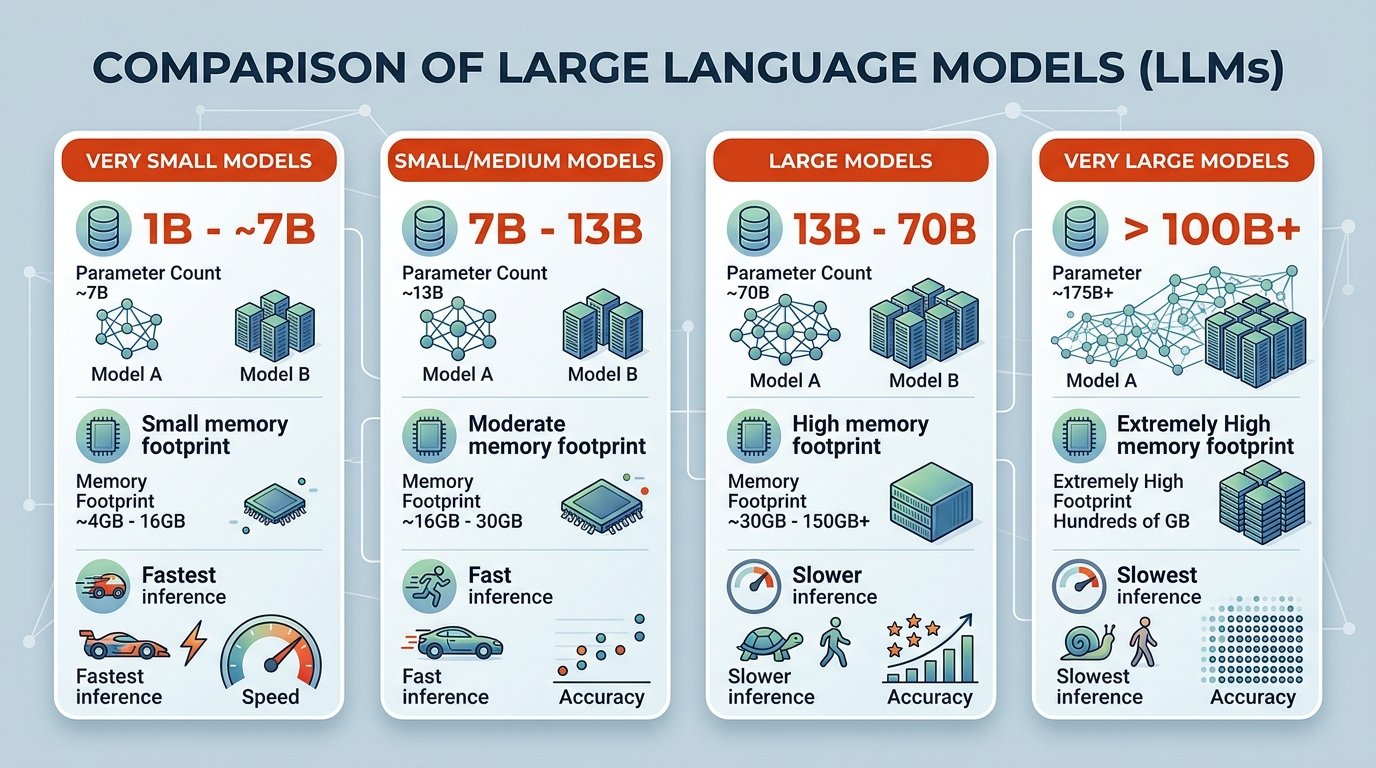
The ecosystem of small language models has matured rapidly. Knowing the available catalog is indispensable for choosing an SLM in an informed way. These are the most relevant ones in 2025-2026:
| Model | Parameters | Strength | License |
|---|---|---|---|
| Phi-4-mini | 3.8 B | Compact reasoning, low consumption | MIT |
| Gemma 3 4B | 4 B | Multimodal, 140+ languages | Gemma (commercial allowed) |
| Llama 3.2 3B | 3 B | Performance/size balance | Llama 3 Community |
| Qwen 3 4B | 4 B | Multilingual, coding, reasoning | Apache 2.0 |
| Mistral 7B | 7 B | Instructions, general use | Apache 2.0 |
Phi-4 (14 B) is the reference SLM in general benchmarks —84.8% on MMLU, surpassing GPT-4o in mathematics— and fits in a 12 GB GPU. However, for projects with more limited hardware, 3-4 B models are the most pragmatic starting point for choosing an SLM without oversizing the infrastructure.
What SLM tools exist for local deployment?
The tools for local SLM deployment have matured to the point where any developer can have a model running in minutes. Choosing an SLM correctly also involves choosing the right deployment tool.
Ollama: the standard for local deployment
Ollama has become the de facto standard for local language model management due to its simplicity: it manages model weights, environment configuration and the API server in a single package. It is one of the first tools you should consider when choosing an SLM for development environments.
Its most practical advantage is automatic integration: Ollama automatically creates a local server at localhost:11434, which allows integrating the model into Python or JavaScript applications with ease. Furthermore, Ollama allows running models without an internet connection, which helps protect sensitive data. You can consult the official Ollama documentation to see the supported models.
LM Studio: visual interface for comparing models
LM Studio provides a graphical interface for users who want to compare different models from Hugging Face; it allows viewing resource usage (CPU/RAM) in real time and selecting specific quantization levels. It is especially useful in the evaluation phase, when you are still trying to choose an SLM among several candidates.
LM Studio became free for commercial use in July 2025. If you are new to the small model ecosystem, LM Studio is the most user-friendly entry point for choosing an SLM without prior experience.
llama.cpp and Hugging Face Transformers
For developers who need greater control, llama.cpp is especially efficient for running quantized models natively. Ollama runs llama.cpp internally, so using it directly gives you access to more configuration options in exchange for greater complexity. This option is suitable when you need to choose an SLM and fine-tune the inference parameters to the maximum.
Hugging Face Transformers offers a wider range of models and tasks. It is the natural option if you already work with the Python machine learning ecosystem and want to integrate an SLM into an existing data pipeline. Choosing an SLM through Transformers gives access to the largest available model repository.
RAG with SLM: connect the model to your documents without retraining it
RAG (Retrieval-Augmented Generation) is the most common architectural pattern for extending the capabilities of an SLM without modifying its weights. The central idea is simple: instead of retraining the model with your data, you provide relevant context in each query, retrieved in real time from your own knowledge base. Choosing an SLM compatible with this pattern greatly expands its usefulness.
The basic flow of a RAG architecture with a local SLM has three steps:
- Indexing: your documents are divided into fragments and converted into numerical vectors using an embeddings model. These vectors are stored in a vector database such as ChromaDB or Qdrant.
- Retrieval: when the user asks a question, the system converts the question into a vector and searches for the most similar fragments in the database.
- Generation: the SLM receives the original question together with the retrieved fragments and generates a response grounded in that specific information.
To implement this pattern with a local model, the two most widely used frameworks are LlamaIndex and LangChain. LangChain excels at orchestrating multi-step AI workflows, while LlamaIndex focuses on optimizing document indexing and retrieval. Both make it easier to choose an SLM and connect it to your internal data sources.
When to use RAG instead of fine-tuning? RAG is the right option when your data changes frequently or when you need the model to cite specific sources. Fine-tuning is more appropriate when you want to modify the model’s response style or specialize its behavior in a static domain. This distinction also influences how to choose the base SLM for each case.
When to use RAG, fine-tuning or base model? Decision table
| Situation | Recommendation | Reason |
|---|---|---|
| The task is well covered by the pre-trained model | Base model | Lower complexity, zero adaptation cost |
| You need answers about your own documents or changing data | RAG | No retraining; updatable in real time |
| You need brand tone, proprietary categories or very specific behavior | Fine-tuning | The model internalizes the style and patterns of the domain |
| Static domain + specific tone + own data | Fine-tuning + RAG | Optimal combination for maximum performance in a closed domain |
This table is a quick guide for choosing an SLM with the correct adaptation strategy according to your specific situation.
SLM fine-tuning: when and how to adjust the model to your domain
Fine-tuning consists of continuing the training of a pre-trained SLM with your own domain data, so that the model internalizes the vocabulary, style and specific patterns of your use case. It is the right option when RAG is not enough: for example, when you need the model to adopt a very specific brand tone or classify according to proprietary categories. Before applying it, it is important to choose a base SLM that is compatible with the adjustment techniques you plan to use.
LoRA and QLoRA: efficient fine-tuning on modest hardware
Full retraining of an SLM requires prohibitive computing resources. Low-rank adaptation techniques (LoRA and QLoRA) solve this problem: instead of updating all the model’s parameters, only additional low-rank matrices are trained that are added to the original, frozen weights. The original LoRA paper (Hu et al., 2021) demonstrated that this technique can match the performance of full fine-tuning with up to 10,000× fewer trainable parameters. This makes choosing an SLM for fine-tuning with LoRA accessible even with modest hardware.
QLoRA takes this a step further by combining 4-bit quantization with LoRA. With QLoRA it is possible to fine-tune 3B parameter models using only 8 GB of VRAM. Choosing an SLM compatible with QLoRA significantly expands the fine-tuning options on consumer hardware.
Fine-tuning tools: Unsloth and Axolotl
Two tools stand out today as the most accessible for fine-tuning SLMs on consumer hardware:
- Unsloth: uses custom CUDA/Triton kernels that accelerate fine-tuning with LoRA and QLoRA up to 5× while reducing memory usage. It is the fastest option for a single GPU. However, it does not support multi-GPU training.
- Axolotl: community-oriented for LLM fine-tuning, with YAML-based configurations and extensive integration with Hugging Face libraries. It is the natural option for multi-GPU environments.
The minimum process for fine-tuning with Unsloth is: prepare a dataset in JSONL format with instruction-response pairs, configure the LoRA parameters, launch the training and export the resulting adapter. With 500-2000 quality examples, an SLM of 3-4 B can specialize notably in a specific task. Choosing an SLM of the right size is the first step before starting any fine-tuning process.
How to implement an SLM in your project step by step?
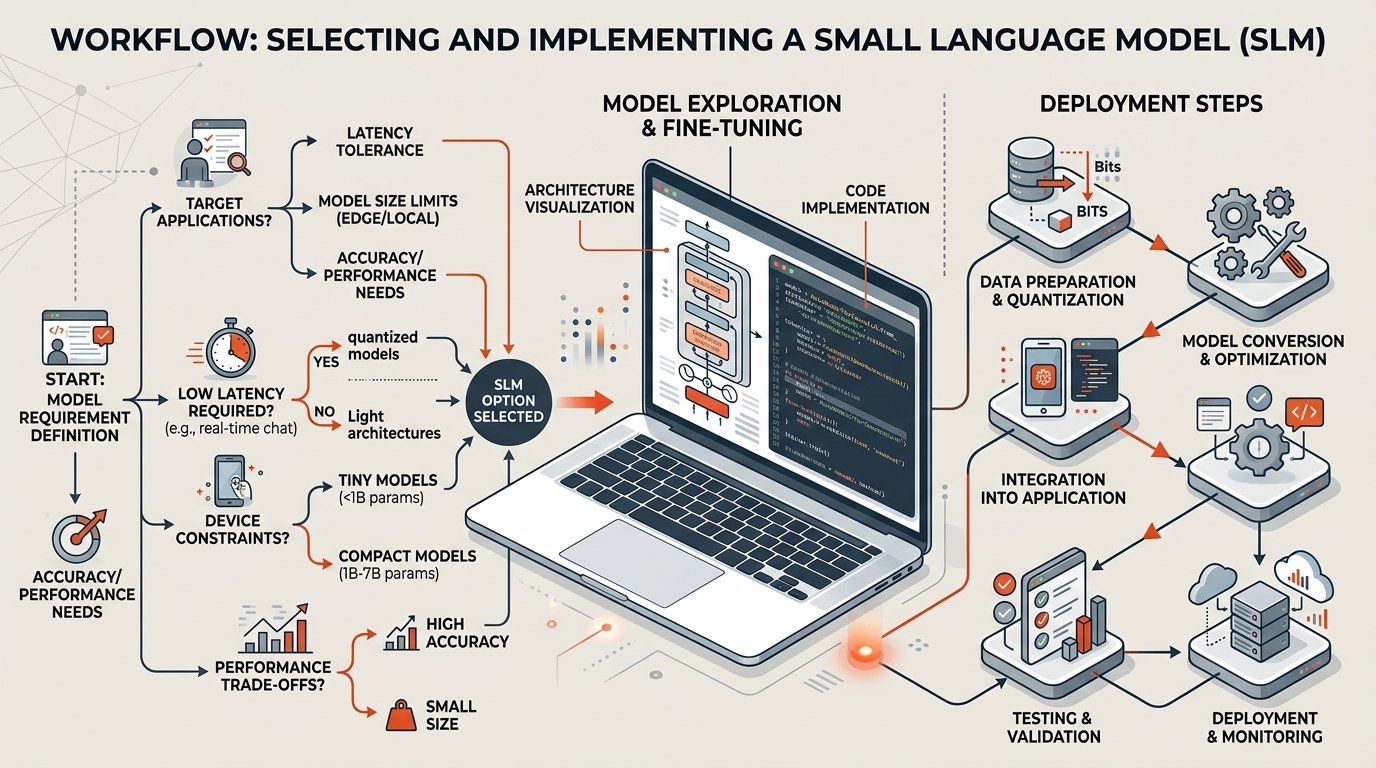
Implementing an SLM in a real project always follows the same process, regardless of the model or tool you choose. These steps also serve as a guide for choosing an SLM with methodological rigor.
- Define the task precisely. Write in one sentence what the SLM must do: “classify support tickets into 5 categories”, “summarize contracts in less than 100 words”. The more bounded the task, the easier it will be to choose the right SLM and implement it.
- Evaluate your available hardware. Check the available RAM, whether you have a dedicated GPU and how much VRAM it has. This will determine the range of model sizes you can run and will significantly narrow down how to choose a viable SLM.
- Select 2-3 candidate models. Using the criteria described above, choose a small set of candidates. For projects in Spanish, Qwen 3 4B, Gemma 3 4B and Llama 3.2 3B are a good starting point for choosing an SLM with multilingual support.
- Install Ollama and download the candidate models. Once installed, download the models with commands like ollama pull qwen3:4b. It is the fastest method for choosing an SLM and testing it locally.
- Evaluate with real data. Prepare a set of 20-50 examples of your use case and run each candidate model. Measure accuracy, latency and subjective quality. This evaluation is the objective basis for choosing the definitive SLM.
- Apply quantization if necessary. If the chosen model is too slow, try a quantized version (Q4 or Q8). Quantization allows choosing larger SLMs without exceeding your hardware limits.
- Integrate via local API. Once the choice is confirmed, integrate it into your application through the local endpoint that Ollama exposes:
Option A — official Ollama library for Python:
# pip install ollama
import ollama
response = ollama.chat(
model=”qwen3:4b”,
messages=[
{
“role”: “user”,
“content”: “Classify this ticket into one of these categories: Billing, Technical support, Shipping, Other. Ticket: ‘My order 12345 has not arrived.'”
}
]
)
print(response[“message”][“content”])
Option B — direct HTTP call with requests:
import requests, json
payload = {
“model”: “qwen3:4b”,
“messages”: [
{
“role”: “user”,
“content”: “Classify this ticket into one of these categories: Billing, Technical support, Shipping, Other. Ticket: ‘My order 12345 has not arrived.'”
}
],
“stream”: False
}
resp = requests.post(“http://localhost:11434/api/chat”, json=payload)
data = resp.json()
print(data[“message”][“content”])
- Consider RAG or fine-tuning if base performance is not sufficient. If the model responds well in general but does not know your own data, implement a RAG pipeline. If you need to change the behavior or style of the model, consider fine-tuning with LoRA/QLoRA. In both cases, choosing a base SLM compatible with these techniques greatly facilitates integration.
- Monitor and adjust. In production, systematic tracking is what separates a prototype from a reliable system. Choosing an SLM with good documentation and an active community facilitates problem resolution in this phase.
SLM monitoring in production: tools and metrics
The monitoring step is the most undervalued of the entire implementation. Without observability, you cannot know when the model fails, why it fails or how to improve it. Choosing an appropriate SLM for production includes considering from the outset how you are going to monitor it.
Traceability tools for LLM
Two tools stand out as the standard for observability of language model-based systems:
- Langfuse: open-source traceability platform for LLMs that records each model call with its prompt, response, latency and estimated cost. It integrates with LangChain, LlamaIndex and direct API calls. It is the most recommended option for small teams that need quick visibility without complex infrastructure. It is especially useful when you have had to choose an SLM without prior experience in observability.
- Phoenix (Arize): open-source tool focused on evaluation and debugging of RAG and LLM pipelines. Especially useful when you have a RAG pipeline and want to understand which fragments are retrieved and how they affect response quality. Choosing an SLM with active community support facilitates its integration with Phoenix.
Minimum metrics to record
Regardless of the tool you use, these are the metrics you should record from the first day in production:
- p50 and p95 latency: the median tells you typical performance; the 95th percentile tells you how long slow calls take. A p95 above 5 seconds is usually unacceptable in interactive applications. If you detect this problem, it may be a sign that you should choose a lighter SLM or apply more quantization.
- Error rate: percentage of calls that return an error or an empty response. A rate above 1% in production requires immediate investigation.
- Response length: responses that are systematically shorter or longer than expected indicate problems with the prompt or the configured temperature.
- Rejection or hallucination rate: in extraction or classification tasks, measure how many responses do not follow the expected format. A sustained increase may indicate that it is worth choosing an SLM with a better fit to your task.
Minimum viable log without external tools
If you cannot integrate Langfuse or Phoenix immediately, this is the minimum log you should implement in Python to have basic visibility:
import time, json, logging
logging.basicConfig(filename=”slm_production.log”, level=logging.INFO)
def call_model_with_log(prompt: str, model: str = “qwen3:4b”) -> str:
import requests
start = time.time()
try:
resp = requests.post(
“http://localhost:11434/api/chat”,
json={“model”: model, “messages”: [{“role”: “user”, “content”: prompt}], “stream”: False},
timeout=30
)
latency_ms = (time.time() – start) * 1000
output = resp.json()[“message”][“content”]
logging.info(json.dumps({
“model”: model,
“latency_ms”: round(latency_ms, 1),
“prompt_len”: len(prompt),
“response_len”: len(output),
“status”: “ok”
}))
return output
except Exception as e:
latency_ms = (time.time() – start) * 1000
logging.error(json.dumps({“model”: model, “latency_ms”: round(latency_ms, 1), “status”: “error”, “error”: str(e)}))
raise
This log in JSONL format is directly importable into any analysis tool and allows you to detect performance degradations without depending on external platforms. It is valid regardless of the SLM you have chosen.
What are the most common mistakes when choosing and implementing an SLM?
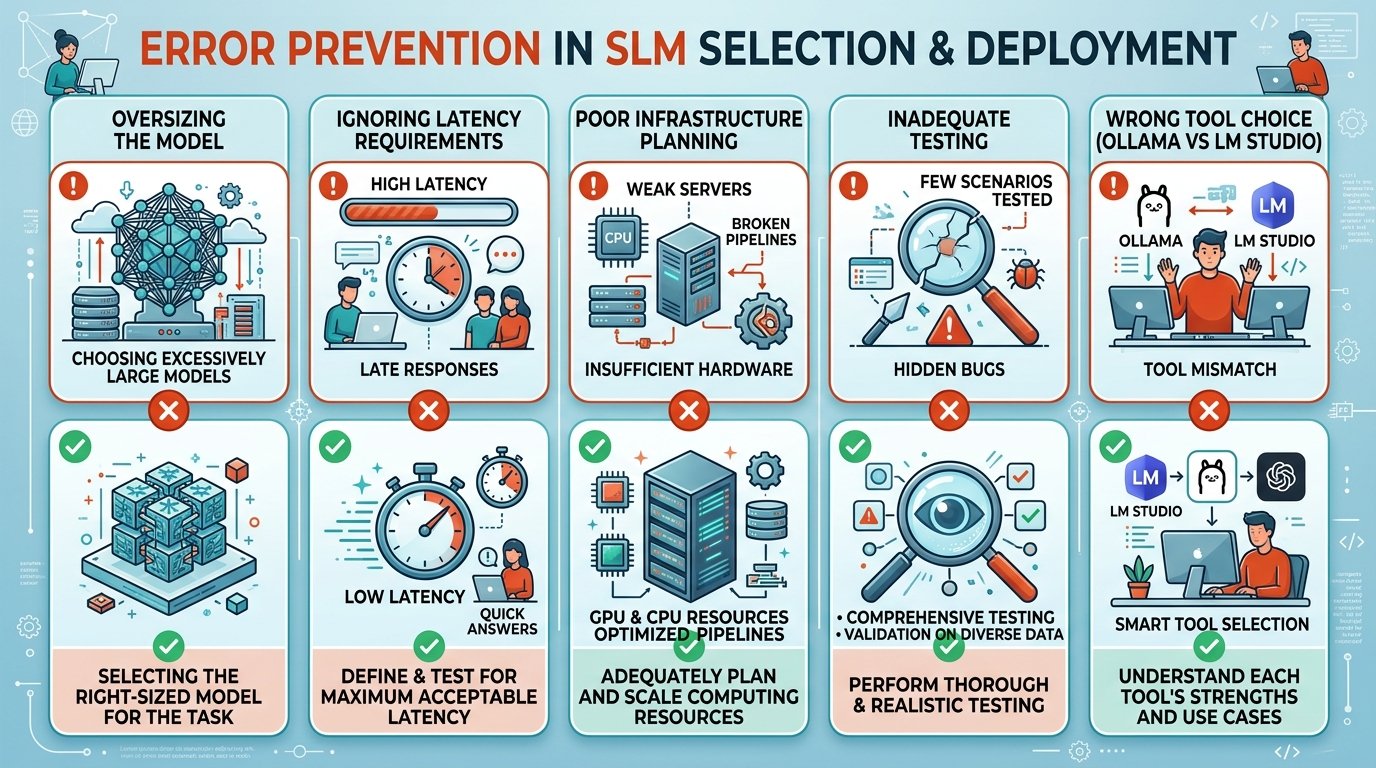
Knowing the common mistakes saves you weeks of work. These are the most frequent ones when working with small language models for the first time and trying to choose an SLM without a clear methodology.
Choosing by popularity instead of by fit to the task
The most downloaded model is not necessarily the best for your case. Always evaluate on your own data before committing. Selecting by popularity without empirical validation is one of the most frequent and most avoidable mistakes when choosing an SLM. Popularity is an indicator of community, not of suitability for your specific task.
Ignoring the limitations of SLMs
Limited processing capacity can lead to reduced accuracy in tasks involving multi-factor reasoning or high levels of abstraction; therefore, they may not be the best option for applications that require high accuracy, such as scientific research or medical diagnosis. Knowing these limitations is an essential part of knowing how to choose an SLM correctly.
Skipping the evaluation phase
Many teams install the first model they find and integrate it directly into production. The evaluation phase with real data is the most profitable investment in the process: it detects problems before they reach users and allows choosing an SLM objectively among the available options.
Not considering multilingual support from the start
If your project operates in Spanish, verifying multilingual support from the beginning is critical. Some models notably degrade their quality in Spanish. Always test with examples in the production language, not in English. Overlooking this point when choosing an SLM can ruin the end-user experience even with a technically solid model in English.
How does local AI deployment fit into a business strategy?
Local AI deployment with small models is not just a technical decision: it is also a strategic decision. Choosing your own SLM allows SMEs and entrepreneurs to have AI capabilities without depending on external providers, without variable per-call costs and without handing over customer data to third parties.
To illustrate the economic argument, this indicative estimate compares the cost of an external API versus own infrastructure for a volume of 1 million inferences per month:
| Scenario | Estimated cost/month | Privacy | Latency |
|---|---|---|---|
| GPT-4o mini API | ~€150-300 | Data at external provider | Variable (network) |
| Local SLM (Qwen 3 4B, own server) | ~€20-40 (electricity + amortization) | Data in your infrastructure | Low and predictable |
| SLM on cloud VPS (shared GPU) | ~€60-100 | Data on your VPS | Medium-low |
The key point is not the exact number, but the cost structure: with external APIs you pay per inference; with your own SLM, the cost is fixed and scales without marginal cost. Beyond a certain volume, the local model is more economical and more secure. Choosing a local SLM over an external API is, at that scale, as important a business decision as a technical one.
The most immediate use cases for marketing and business teams include: automatic lead classification, sentiment analysis in reviews, generation of internal content drafts, or customer service assistants that run entirely on your own infrastructure. The key is to start with a bounded task, measure it and scale only when the value is proven. Choosing the right SLM for that first use case is the starting point of any sustainable local AI strategy.
Frequently asked questions
How much RAM do I need to run an SLM locally?
It depends on the model size. For 3-4 B parameter models with Q4 quantization, 8 GB of RAM is sufficient on a modern laptop without a dedicated GPU. For 7 B models, it is recommended to have at least 16 GB of RAM or a GPU with 8 GB of VRAM. Tools like LM Studio show you consumption in real time before confirming the choice, which greatly facilitates knowing how to choose an SLM that fits your hardware.
What is the difference between Ollama and LM Studio for implementing an SLM?
Ollama is developer-oriented: it manages models from the command line and exposes a local API that you can consume from any application. LM Studio offers a more visual graphical interface, ideal for comparing models and exploring options without writing code. For production, Ollama is the most common option; for evaluation and experimentation, LM Studio is more comfortable. Both tools are complementary and useful in different phases of the implementation process. Choosing an SLM with one or the other depends on the stage of the project and the team’s profile.
Can I use an SLM in Spanish with good quality?
Yes, but you must choose a model with real multilingual support; this is one of the most important considerations when choosing an SLM for projects in Spanish. Qwen 3 and Gemma 3 are the most solid options for Spanish in the small model range. Always verify performance with examples in Spanish before deciding, as benchmarks are usually measured in English and do not necessarily reflect quality in other languages.
How do I monitor an SLM in production without complex tools?
The most accessible starting point is a structured log in JSONL format that records latency, prompt and response length, and the status of each call. With that log you can detect performance degradations in any analysis tool. When volume grows, Langfuse (open-source) is the most recommended option for complete LLM traceability without complex infrastructure; Phoenix (Arize) is the best alternative if you have a RAG pipeline and need to evaluate retrieval quality. Choosing an SLM with an active community also makes it easier to find solutions to monitoring problems.
When does it make sense to fine-tune instead of using RAG?
RAG is the first option when your data changes frequently or you need the model to cite specific sources: it requires no retraining and is updatable in real time. Fine-tuning is the right option when you need to modify the base behavior of the model: adopting a specific brand tone, classifying according to proprietary categories or generating code in an internal framework. Both patterns are complementary: combining them is the route to the best performance in closed domains. The decision about which to use also influences how to choose the most suitable base SLM for each approach.
Sources
- torchtune: PyTorch native post-training library
- LangChain vs LlamaIndex 2025: Complete RAG Framework Comparison – Latenode Blog
- Llama Index vs Langgraph: Complete RAG Framework Comparison – Latenode Blog
- Best RAG Frameworks 2025: LangChain vs LlamaIndex vs Haystack vs RAGFlow | LLM Practical Experience Hub
- Axolotl vs Unsloth vs TorchTune: Best LLM Fine-Tuning Frameworks in 2026 | Spheron Blog